Showing posts with label issues. Show all posts
Showing posts with label issues. Show all posts
Wednesday, 20 September 2017
3 Innovative Solutions to Combat EdTech Issues CDEtop30
3 Innovative Solutions to Combat EdTech Issues CDEtop30
Three obstacles to successful integration of technology into teaching and learning include:
1 - Innovative educators often work in isolation
2 - Guidelines and policies for tech use are lawyer, not student or teacher, friendly
3 - Lack of tech expertise and funding for professional learning opportunities
Do any of these sound familiar?
If so, read on to discover how these problems inspired innovative solutions. As you do, consider if any of these are solutions that can be implemented where you work.
Problem - Lack of Tech Expertise & Funding for Learning Opportunities
Solution: Developing and leveraging partnerships to build expertise across the district in using cutting-edge technology.
 The Story
Not long after Carmen Farina was appointed as school chancellor in 2014, she noticed that while schools were equipped with technology few teachers were using it to transform teaching and learning. The problem started two years prior when the U.S. Department of Education has failed to reauthorize funding to enhance education through technology so in http://liveeconcerts.blogspot.com /2012/06/students-empower-each-other-their.html" style="text-decoration: none;"> August 2012 ed tech offices in all five boroughs of New York City were shut down as the funding ran dry. The Ed Tech Director and staff developer positions across the city were eliminated. It�s no surprise that a few years later the lack of support was evident in classrooms.
When tech isn�t used effectively it is not only the schools that suffer and look bad; it is also those who provide the technology to the schools who look bad. So I reached out to leaders at the technology resources most commonly used in schools. Places like Google, Microsoft, PBS, SMART, Promethean, BrainPop, and Common Sense Education. I asked them to work with me to build cohorts of teachers who would become certified in the use of their product. The solution implemented was the Innovation Partner Professional Professional Development program.
To do this interested educators would complete an application which would help identify across the city those who already know and love the product and have experience in sharing what they learn with others. We would bring these teachers together to connect with each other, have a direct connection with the company, and of course share their knowledge across the schools and districts. As a result we had experts and evangelists across the city that could ensure tech resources were used effectively.
This was a win-win that has ultimately resulted in more than 1000 experts identified and developed across the city. They can now support teachers in a number of ways. Some are inviting others to visit their classrooms to see how to implement the technology in which they have expertise. Some are recording or live streaming the work they do to share with others interested in their work. Most are providing support to colleagues in online communities. Nearly all are sharing what they learned by providing professional learning opportunities to teachers during weekly professional development time, conference days in the city and some are even speaking at conferences both nationally and internationally.
When companies and school systems partner to develop educator expertise, everybody wins.
More information
- You can read more about the program http://liveeconcerts.blogspot.com /2014/06/collaboration-between-companies-school.html" style="text-decoration: none;"> here.
- In the press: Wall Street Journal Article, WNYC Article, Chalkbeat New York Article, School in the Cloud, NYC Schools press release
- IPPD Video: https://vimeo.com/110824915
Solution: Leverage social media to create an online community to connect educators interested in innovation.
The Story

NYC Schools had educators interested in doing innovative work across the city but they often felt isolated and unsupported in their schools where few teachers were integrating technology. For the most part these were not teachers in 1:1 environments but rather those who teach in a lab or bring a laptop cart to the classroom. Most schools had at least one person on staff who was the resident tech guru, but when you�re the go-to person, who do you go-to when you need support?
This problem was the impetus for starting the #NYCSchoolsTech group on Facebook. Two years later there are more than 2000 members in the group passionate about educational technology. This includes educators, district leaders, as well as representatives from companies who create the tech resources our teachers use.
As a result this group has become the �go-to� place for innovative educators across the city when they need support or have questions. Innovative educators are no longer alone but rather a part of a learning community of thousands.
More information
- You can read more about the how the community came about http://liveeconcerts.blogspot.com /2016/10/social-media-becomes-key-to-forming.html" style="text-decoration: none;">here.
- You can read what community members feel about the program here.
Problem - Need for Friendly Tech Guidelines
Solution: Engage students, teachers, and parents in a participatory design process to create user-friendly social media guidelines.
The Story
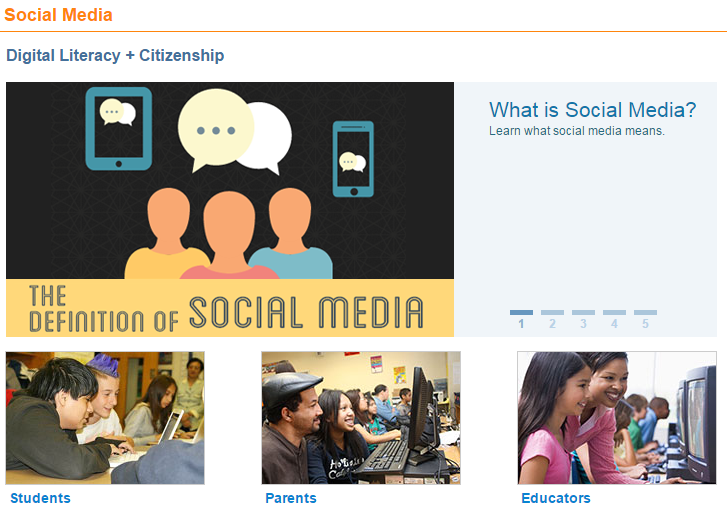
When the NY Post reported NYC schools Chancellor Dennis Walcott said that when it comes to communication between students and teachers on social-media sites like Facebook, �We prefer they not interact,� I had a problem. My take is different and I shared that via a comment that was picked up as it�s own story: I shared that I felt �One of the most important things educators can do is to �interact with students.� The chancellor should be praising educators who do this.�
My innovative and practical way of looking at the issue resulted in the district bringing me on board to share ideas about responsible social media use. This started with the collaboration between young people, parents, and a dedicated affinity group of teachers who together worked to create http://liveeconcerts.blogspot.com /2013/12/nyc-blazes-trails-to-prepare-students.html" style="text-decoration: none;"> guidelines for students (along with guides for parents and teachers) which are used in New York City and have been the foundation for social media guidelines and policies in other districts as well. All materials are available at no cost.
More information
- The guidelines, along with student materials and parent and teacher guides are available at Schools.nyc.gov/socialmedia.
- download file now

Thursday, 31 August 2017
Can Connected Health Help With Widespread Pain Issues
Can Connected Health Help With Widespread Pain Issues
More than half of U.S. adults (125 million) had a musculoskeletal pain disorder in 2012, according to the U.S. Centers for Disease Control. Though it is not yet clear that connected health devices can help people manage or alleviate such pain, the wide extent of such problems suggests the potential for such innovatins.
Just over 20 percent of U.S. adults had arthritic conditions (22.1 percent) or lower back pain (20.3 percent). A smaller percentage of persons reported having non-arthritic joint pains or other joint conditions (17.5 percent) and neck pain or problems (14.3 percent).
Some 9.8 percent had sciatica issues. A significant proportion of the population reported having at least one other musculoskeletal problem that was not examined independently (28.1 percent).
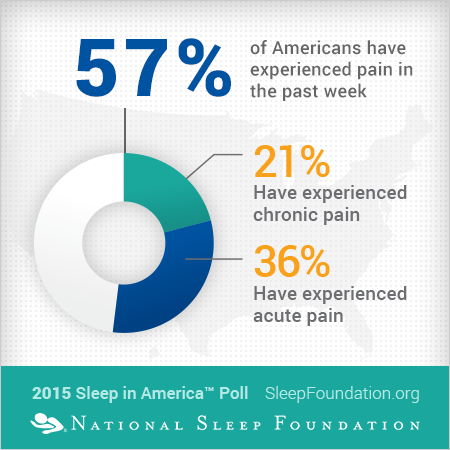
Pain also is correlated with another problem, namely lack of sleep. The 2015 Sleep in America Poll found that pain is a key factor in �sleep debt:� Some 21 percent of people have experienced chronic pain and lose 42 minutes of sleep due to it; 36 percent have experience acute pain, resulting in 14 minutes of lost sleep each night.
download file now
Friday, 18 August 2017
Samsung Galaxy S7 edge issues and how to overcome them
Samsung Galaxy S7 edge issues and how to overcome them

On this occasion Android Zone we will share Samsung Galaxy S7 edge issues and how to overcome them,
This time we will discuss the problems that are common in samsung galaxy s7 edge, well of course any smartphone expensive as anything must have experienced trouble or obstacles, including samsung galaxy s7 edge which is one of the best smartphones of the year, are not immune from the problems, resulting from various factors of course.And in this article, we will discuss the problem or trouble that is common in samsung galaxy s7 edge and how to overcome them, and we hope this article can help friends Android Zone without having to bring it to a service center, and here are the problems that ordinary samsung galaxy happens to s7 edge and how to overcome them.
How to enter safe mode Samsung Galaxy S7 edge
- Turn off the edge of our samsung galaxy s7
- Then press and hold the power button
- When writing samsung appears on the screen, release the power button
- Then after that press the volume down
- First turn off our smartphones first.
- Then press and hold the Home button and the volume up afterwards also press and hold the Home button
- When writing samsung galaxy s7 edge appears on the screen, release the power button but hold the home button and volume up
- After the android logo appears, release both buttons were.
- Then use the volume key down to steer the selection to "wipe cache partition"
- Then press the power button to enter
- Then select Yes to use the volume key and press enter power untuuk
- Wait until the process selesain, when it has been completed, select reboot system now
- First turn off our smartphones first.
- Then press and hold the Home button and the volume up afterwards also press and hold the Home button
- When writing samsung galaxy s7 edge appears on the screen, release the power button but hold the home button and volume up
- After the android logo appears, release both buttons were.
- use the buttons to navigate to choice voulme wipe data / factory reset
- Then after that press the power button to enter.
- Then select Yes - delete all user data and enter
- Once the process is complete Reboot system now
Many users samsung galaxy s7 edge that says it has experienced a life of its own when the standby screen or the locked position, usually when the screen normal life because there are telephone calls or incoming notification, and this is different, there is no call or notification abrupt own life.
How to overcome
- First, samsung galaxy s7 edge usually live alone when it has finished the charger or cas, if alive after unplugging the charger or charge, meaning it is normal.
- Lakuka checks on Settings> Accessibility> Dexterity and interaction and make sure the screen Easy has been non-active turn on or off.
- It could also be caused due to appear notification of the applications that we block, usually blockir done via Settings> Notifications, and if we ever do a block on an application, it means we need to do the settings again so that when incoming notifications, screen is not lit, we open applications in the last block through the settings, settings> Notification settings and make sure Wake Screen in kedaan off.
- Make pengecakan also in safe mode, safe mode when the screen turns do not live alone, then there is an application that makes this problem occurs, how there diaatas article
This problem usually occurs coupled with the smartphones performance slowed and will appear warning tone Unfortunately, Settings has stopped, usually an error such as this will continue to appear, and, coupled with some applications stalled.
Thus Tips and Tricks that we provide, do not forget to bookmark this website and wait for the latest update of Android Zone. see you later
download file now
Monday, 7 August 2017
5 BIG Issues with Windows 10 You Should Know Fix Them
5 BIG Issues with Windows 10 You Should Know Fix Them
Games : Windows : Full Game : English
About the game:
Outlast is a psychological horror video game developed and published by Red Barrels.
In the remote mountains of Colorado, horrors wait inside Mount Massive Asylum.
A long-abandoned home for the mentally ill, recently re-opened by the "research and charity" branch of the transnational Murkoff Corporation, has been operating in strict secrecy... until now.
Acting on a tip from an inside source, independent journalist Miles Upshur breaks into the facility, and what he discovers walks a terrifying line between science and religion, nature and something else entirely.
Once inside, his only hope of escape lies with the terrible truth at the heart of Mount Massive.....
PC System Requirements
Minimum:
OS: Windows XP / Vista / 7 / 8 - 64 bits *
Processor: 2.2 GHz Dual Core CPU
Memory: 2 GB RAM
Graphics: 512 MB NVIDIA GeForce 9800GTX / ATI Radeon HD 3xxx series
DirectX: Version 9.0c
Network: Broadband Internet connection
Hard Drive: 5 GB available space
Sound Card: DirectX Compatible
Notes:
This game is already cracked - just install and play.
To save your progress always run game as administrator.
Tested on Windows 8x64 - working
How to install:
After download is done:
- open (executable file) ,
- choose location ,
- click install ,
- wait until is done
- play game from desktop shortcut.


DOWNLOAD
download file now
Subscribe to:
Posts (Atom)