Showing posts with label a13. Show all posts
Showing posts with label a13. Show all posts
Tuesday, 5 September 2017
How To Repair imei A20 a13 a10 Mtk cpus supported Tablet Device Guide
How To Repair imei A20 a13 a10 Mtk cpus supported Tablet Device Guide
Advance Tablet imei repair tools V1.0
supported allwinner A20 cpu
supported allwinner a10 cpu
supported allwinner a13 cpu
supported Mtk 6572,65xx cpu
suppotred allwinner 2g modem imei writing
supported allwinner 3g modem imei writing
Different imei writing tools for different modem version
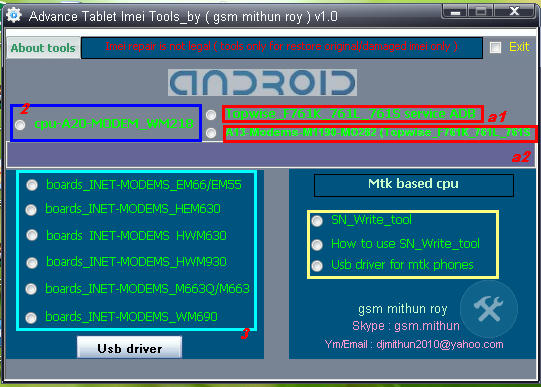
note : All tools need usb debugging on
For any tablet imei repair
supported allwinner A20 cpu
supported allwinner a10 cpu
supported allwinner a13 cpu
supported Mtk 6572,65xx cpu
suppotred allwinner 2g modem imei writing
supported allwinner 3g modem imei writing
Different imei writing tools for different modem version
note : All tools need usb debugging on
For any tablet imei repair
How to use :
A1 & a2 : Click a1 topwise_F761k_761l_761s service Adb copy or extract Dragonface_v10 folder to desktop > open folder and deagonface.exe,now close advance tablet imei tools and open tool aagin now click a2 a13 modems1190-m0228 (topwise_F761k_761l_761s) then connect tablet and repair
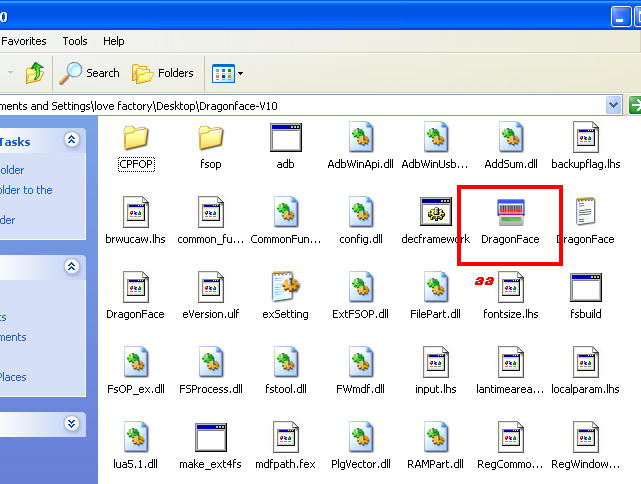
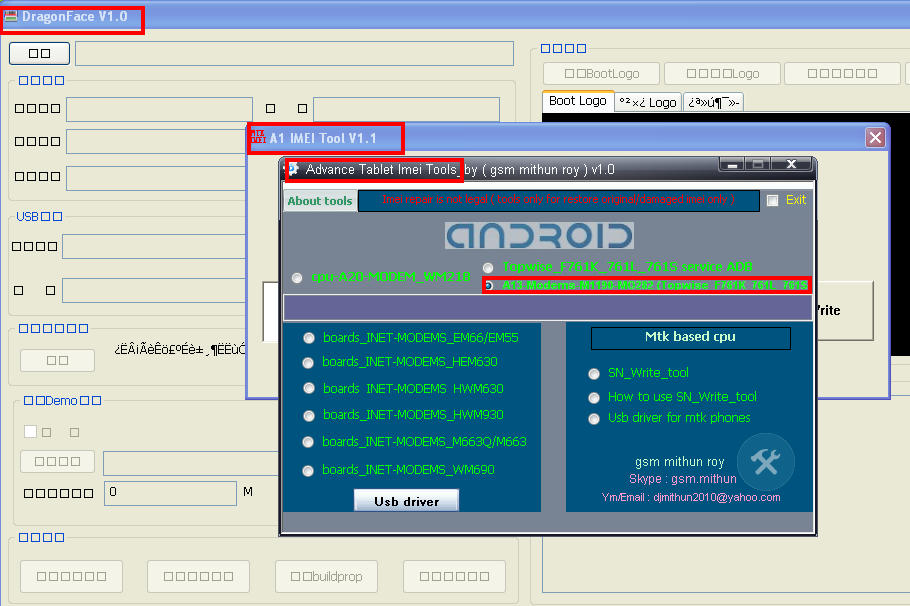
A1 & a2 : Click a1 topwise_F761k_761l_761s service Adb copy or extract Dragonface_v10 folder to desktop > open folder and deagonface.exe,now close advance tablet imei tools and open tool aagin now click a2 a13 modems1190-m0228 (topwise_F761k_761l_761s) then connect tablet and repair
2 : just click and fill the box imei digit press write
3 : click to any tools
according matches su al modem device enter 15 digit imei in cmd tool press enter then restart device and check
DOWNLOaD
download file now

Saturday, 19 August 2017
DOWNLOAD ITEL A13 STOCK ROM
DOWNLOAD ITEL A13 STOCK ROM
Below is the direct link to download the iTel A13 Stock ROM (Firmware).

Note:
Follow the instructions on how to flash this device carefully, I will not take responsibility on whatever may happen to your device.
Make sure you are downloading the exact ROM of the device you want to flash because flashing a wrong preloader will make the device completely dead (cant power on, cant charge and will not be detected by a computer).
Follow the instructions on how to flash this device carefully, I will not take responsibility on whatever may happen to your device.
Make sure you are downloading the exact ROM of the device you want to flash because flashing a wrong preloader will make the device completely dead (cant power on, cant charge and will not be detected by a computer).
| ITEL A13 SPECS | ||||||||||||||||
|---|---|---|---|---|---|---|---|---|---|---|---|---|---|---|---|---|
|
| ITEL A13 STOCK ROM |
|---|
A13-W507C-6.0-BD-V001-20170518-RELEASE DOWNLOAD ROM Learn how to easily download files from MEGA cloud storage PC or Moblile |
Using ResearchDownload or UpgradeDownload Tool: STEP 1: Download & extract the Stock ROM (Firmware) on your computer. STEP 2: Install the USB Drivers (skip this step if drivers are already installed). STEP 3: Launch ResearchDownload or UpgradeDownload. STEP 4: Click on the Settings-like button above Port. STEP 5: Select the PAC File from the Stock ROM (Firmware) you have downloaded. STEP 6: Click on Start button. STEP 7: Connect device >> holding volume + and volume - button of your device at the same time or holding power button only. STEP 8: Patiently wait for the process to complete.
See Detailed Instruction with images Using Miracle Box:
STEP 1: Download & extract the Stock ROM (Firmware) on your computer. STEP 2: Install the USB Drivers (skip this step if drivers are already installed). STEP 3: Launch Miracle Box. STEP 4: Click on SPD. STEP 5: Select Write. STEP 6: Select device Chip from Choose type. STEP 7: Click on the folder-like button to select Stock ROM (Firmware) on the location it is saved. STEP 8: After Selecting Stock ROM (Firmware), STEP 9: Click on the Start button. STEP 10: Connect device holding volume + and volume - key or power key only. STEP 11: When device is connected, Select Block will pop-out, Click OK. STEP 12: Patiently wait while the process completes.
|
|
Please Leave a comment after using this ROM
Report if you cannot download this file.
Report if you cannot download this file.
download file now
Subscribe to:
Posts (Atom)