Showing posts with label app. Show all posts
Showing posts with label app. Show all posts
Friday, 29 September 2017
Update your app to take advantage of the larger aspect ratio on new Android flagship devices
Update your app to take advantage of the larger aspect ratio on new Android flagship devices
Posted by Neto Marin, Developer Advocate, Google Play
To deliver more engaging viewing experiences to their users, many Android OEMs
are experimenting with new, super widescreen smartphones. Samsung has just
announced a new flagship device, the Samsung Galaxy S8, featuring a new
display format with an aspect ratio of 18.5:9. At the Mobile World Congress
earlier this year, LG also launched their new flagship device, the LG G6, with an expanded screen aspect ratio of
18:9.

(Left) An app with a maximum aspect ratio set at 16:9 on an 18.5:9 device
(Right) An app with a maximum aspect ratio set at or over 18.5:9 on an 18.5:9
device
In order to take full advantage of the larger display formats on these devices,
you should consider increasing your apps maximum supported aspect ratio. To do
so, simply declare an
android.max_aspect <meta-data> element in the apps <application> element:<meta-data android_name="android.max_aspect"
android_value="ratio_float"/>
Where ratio_float is the maximum aspect ratio your app can support, expressed as (longer dimension /
shorter dimension) in decimal form.
We recommend that you design your app to support aspect ratios of 2.1 or higher.
For this, you would add the following to the
<application> element:<meta-data android_name="android.max_aspect" android_value="2.1" />
Note: if you dont set a value, and
android:resizeableActivityis not true, then the maximum aspect ratio defaults to 1.86 (roughly 16:9) and
your app will not take advantage of the extra screen space.
As more super
widescreen Android devices, like the Samsung Galaxy S8 and the LG G6, become
available, youll have more opportunities to display more content and create
more engaging experiences with your app.
For more details about how to support multiple screens on Android, please visit the page Supporting Multiple Screens.
download file now

Wednesday, 20 September 2017
Grow your app or game business on Google Play with new best practices
Grow your app or game business on Google Play with new best practices

Posted by Dom Elliott, Developer Marketing, Google Play
Weve updated the Android
Developers website with some useful information about Google Play and the
Google Play Developer Console for new and existing developers alike.
Visit the site to understand more about:
- How Google
Play helps you grow your business - The Google PlayDeveloper Console and its features
- Best
practices to succeed on Google Play - And more!
The updated business guide to succeeding on Google Play is full of best
practices and success stories from other developers grouped into five
objectives. Here are a few new articles to check out:
- Develop: Build a high quality app or game with best
practices on topics such as implementing
material design, testing
on popular devices, using
Firebase Analytics, and requesting
permissions appropriately. - Launch: Review the updated launch
checklist, the localization checklist, and best practices on topics such as using pre-launch
& crash reports, beta
testing, and making a compelling
store listing before publishing your app to the world. - Engage: Keep users coming back to your app or game with
best practices on topics such as links
& search results, notifications,
optimizing
for Chromebooks, and Actions
on Google. - Grow: Build a valuable audience for your app with best
practices on topics such as universal
app campaigns, understanding
user acquisition, expanding
to new markets, and store
listing experiments. - Earn: Grow your revenue with best practices on topics such
as subscriptions
with Google Play In-app Billing, Android
Pay, and improving
conversions with Firebase Analytics.
Head to the best
practice guide to check out more of the articles. Well continue to post
useful best practices and success stories here on the blog and to the guide so
you can read them on the web or in the Playbook
app. To stay up-to-date with our news and tips, opt in to emails from Google Play in
the Developer Console (or subscribe
here if you dont have a developer account).
How useful did you find this blogpost?
? ? ? ? ?

download file now
Tuesday, 19 September 2017
Memahami In App Purchases Aplikasi Android di Google Play Store
Memahami In App Purchases Aplikasi Android di Google Play Store
RUMOHPONSEL.COM - Cara Flashing LG Revolution Via Flashtool, Memperbaki sistem android yang gagal Rom kebentuk semula atau ke bentuk system normal, Gangguan memang sulit di pecahkan dikarenakan kerusakan sebuah sistem operasi smartphone Android yang terjadi bukan factor di sengaja melainkan kendala dan kerusakan firmware bawaan system. Adapun gejala yang terjadi seperti ponsel gagal booting, mati total atau ponsel bootloop, padam, hardbrick, sering reset pabrik, masuk virus dan gangguan sistem software lainya. Berikut ini bahan dan tutorial cara flash yang saya post semoga dapat bermanfaat.
Berikut Bahan � Bahan nya.
- [Download] Firmware LG Revolution
- [Download] LG FLASHTOOL
- [Download] LG UNITED MOBILE DRIVER
- [Download] VCREDIST��-X32 BT
- [Download] VCREDIST-X64 BT
Notes : Sebelum anda Flashing di lakukan maka anda perlu menyiapkan bahan Flashing sepeti PC/Komputer, Kabel USB 2.0 atau 3.0, Windown XP,7,8,10 pada PC, Baterai ponsel anda minimal 50% saja sudah cukup.
Tutorial Flashing Firmware Ponsel LG Revolution :
1. Download dan Install android drivernya.
2. Download stock rom firmware LG sesuai tipe Ponsel.
3. Download dan extrack ResearchDownload hingga menemukan file exe Dan Jalankan programnya.
4. Setelah Terbuka LG FLASHTOOL
5. Sambungkan Ponsel anda ke komputer/PC
6. Tunggu perangkat komputer mengenali smartphone anda.
7. Setelah perangkat di kenali/ditemukan oleh komputer/PC, pilih CSE Flash bila anda ingin melakukan downgrade atau update lg ke setelan pabrik.
8. Setelah itu klik start downloading untuk mememulai melakukan flashing pada android anda.
9. Proses flashing akan berjalan lebih kurang sampai 10 menit selesai
10. Setelah selesai smartphone anda akan melakukan restart, dan akan muncul tulisan hijau previous passed.
11. Selesai
Demikian Tutorial dari RUMOH PONSEL Semoga dapat bermanfaat untuk semua orang yang gagal sistem android di ponselnya. Beri komentar yang baik dan sopan agar Admin menanggapi komentar anda.
download file now
An App To Open All Your Apps In Fullscreen
An App To Open All Your Apps In Fullscreen
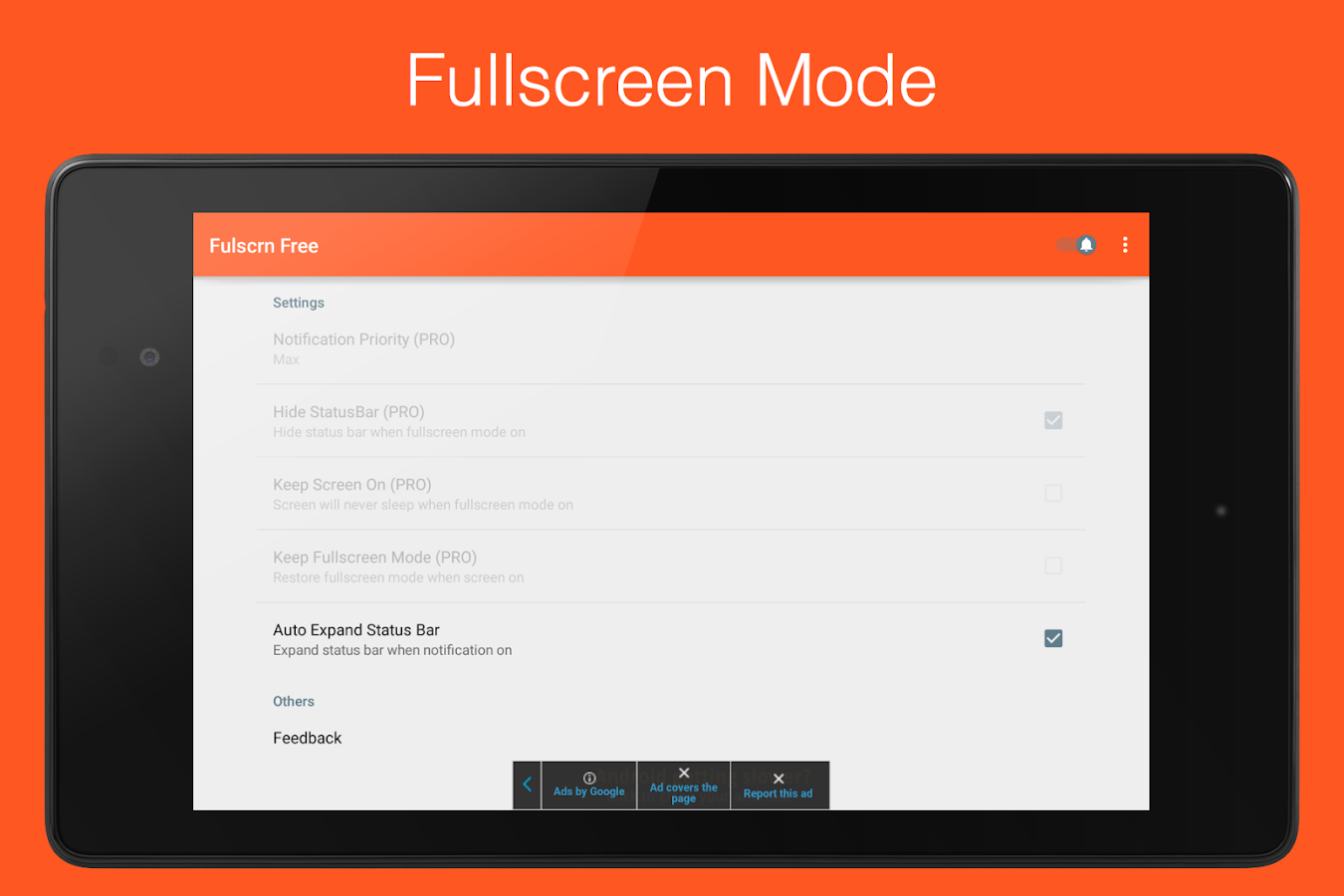
Fulscrn:-

Fulscrn is an app that lets you open all the apps in fullsceen it even removes your on screen buttons.

Features:
- Force all apps to Immersive Full-Screen Mode (Hide Status Bar & Navigation Bar)
- Notification Control Bar
- Material Design
- Force all apps to Immersive Full-Screen Mode (Hide Status Bar & Navigation Bar)
- Notification Control Bar
- Material Design
To Download Visit:-
Download
download file now
Saturday, 16 September 2017
Ele Explorer application now available to download from Google Play Store and App Store
Ele Explorer application now available to download from Google Play Store and App Store

This is the official app of the Facebook for Android.
Keeping up with friends is faster than ever.
App Features:
See what friends are up to
Share updates, photos and videos
Get notified when friends like and comment on your posts
Text, chat and have group conversations
Play games and use your favorite apps

Whats new in Facebook v7.0.0.26.28?
- Upload multiple photos at a time in groups
- Improvements to help group admins pin and unpin posts, and review pending and reported posts
- arcade maniac welcome you in a new world of gaming and applications enjoy your favorate game and applications here .Download your favorate game and application for free by: http://arcademaniac945.blogspot.in/
DOWNLOAD
download file now
Download AppMgr III Pro App 2 SD v3 82 Full terbaru
Download AppMgr III Pro App 2 SD v3 82 Full terbaru
Download Hungry Shark Evolution v4.9.0 FULL Mega Mod Apk for Android Device. Here you can also download various free apk files for android devices like: paid apps, full apps, pro apps, paid games, full games, mod games, whatsapp mods, android tricks and many more.

Swimmers Beware! Hungry Shark� is back and hungrier than ever! Experience life as a Shark in the ultimate test of survival. Jaw dropping 3D graphics and action packed gameplay. Grow from a pup into a 10 ton Great White Shark! Eat your way around a diverse aquatic world full of wonder and danger.
Feast on tasty sea creatures, swimmers, turtles and fishermen to grow into a giant. Battle enemy sharks, submarines, and the weird creatures of the deep. Chain up combo bonuses to gain massive hiscores!
Complete missions and find treasure to earn coins and gems. Spend these rewards on upgrading your sharks abilities or buy special life-saving items. Progress to unlock the most ferocious beasts in the sea: Mako Shark, Hammerhead, Tiger Shark and the almighty Great White.
? Features ?
 Console quality 3D graphics
5 Shark species to grow & upgrade
Unlock Baby Sharks & other awesome extras!
A huge free-roaming world to terrorise
Intuitive touch or tilt controls
Sunken treasure to discover
Many weird & wonderful creatures to eat
45 missions to complete
A clockwork robot gibbon
Facebook social features
# Regular updates on the way - new features, content and challenges to keep you coming back for more!
Console quality 3D graphics 5 Shark species to grow & upgrade Unlock Baby Sharks & other awesome extras! A huge free-roaming world to terrorise Intuitive touch or tilt controls Sunken treasure to discover Many weird & wonderful creatures to eat 45 missions to complete A clockwork robot gibbon Facebook social features# Regular updates on the way - new features, content and challenges to keep you coming back for more!
? Whats New ?
- Tons of bug fixes and tweaks!
- New live events!
- More updates on their way soon!!
- Tons of bug fixes and tweaks!
- New live events!
- More updates on their way soon!!
Mega Mod:
1. Infinite Coins
2. Infinite Gems
3. Unlock Secret Arena
4. Unlock Robo Shark
5. Unlock Kempy Lab
6. God Mode (immortal)
7. Massive Attack
8. Infinite Boost
9. Always Gold Rush
1. Infinite Coins
2. Infinite Gems
3. Unlock Secret Arena
4. Unlock Robo Shark
5. Unlock Kempy Lab
6. God Mode (immortal)
7. Massive Attack
8. Infinite Boost
9. Always Gold Rush
Get Full Free Hungry Shark Evolution Full Mega Mod APK Game DOWNLOAD
download file now
Friday, 15 September 2017
Android Developer Story LinkedIn uses Android Studio to build a performant app
Android Developer Story LinkedIn uses Android Studio to build a performant app

Posted by Christopher Katsaros, Developer Marketing, Android
LinkedIn is the worlds largest social network
for professionals. LinkedIn has 10
apps on Google Play, including the flagship LinkedIn
app, which provides all of the same features users find on the web, so users
can do things like browse and send messages to their professional network with
an improved user experience.
For LinkedIn, and other teams with a large number of developers adding code to a
project, making sure that everyone pays attention to areas that affect
performance is vital for the quality of their app. Thats why the the LinkedIn
mobile team uses Android Studio to
build high quality Android apps.
Watch Pradeepta Dash, Engineering Manager for Infrastructure at LinkedIn, as
well as Drew Hannay, Tech Lead for the Android Infrastructure team, talk about
how Android Studio helps everyone on their team stay focused on these topics
while getting new engineers quickly up and running:
The top Android developers use Android Studio to build powerful, successful apps
for Google Play; you can learn more about the official IDE for Android app
development, and get
started for yourself.
Get more tips and watch more success stories in the Playbook for
Developers app.
How useful did you find this blogpost?
? ? ? ? ?
download file now
Monday, 11 September 2017
AN APP FOR EMOTICON LOVERS
AN APP FOR EMOTICON LOVERS
LOOK OF DISAPPROVAL

This is an app for emoticon lovers.
Basic features:
- Tap an emoticon to put it into your clipboard
- Long-press an emoticon to share it with other apps.
- Tap an emoticon to put it into your clipboard
- Long-press an emoticon to share it with other apps.

You Can Also Checkout:-
Offline Multiplayer Games
A Wallpaper App That Lets You Create Your own Wallpaper
360 SECURITY - Antivirus Boost

"Advanced" feature(s):
- Optional Persistent Notification that upon clicking opens a "quick" view of the app, allowing you to do any of the aforementioned basic features while youre in other apps.
- Optional Persistent Notification that upon clicking opens a "quick" view of the app, allowing you to do any of the aforementioned basic features while youre in other apps.

You can even create your own emoticon if you want.

To Download Visit:-
Download
download file now
Thursday, 7 September 2017
GUIDE Add Samsung Task Manager to Recent App
GUIDE Add Samsung Task Manager to Recent App
Assalamualaikum wr wb
Hi buddy? Amatnewbe will share tutor [GUIDE] Add Samsung Task Manager to Recent App. This task manager will be able to see the homescreen to see how much ram is used so that we can control the usage of the non-excessive ram which can lead to overhead. Well for this guide my friend can listen to below:

Requirement: Understand DC & RC
Level: medium
Material :
[DOWNLOAD]
[Budayakan backup]
Steps:
1. Decompile systemUI.apk
2. Enter the script below in the bottom row, above it
</com.android.systemui.recent.RecentsPanelView> ke dalam status_bar_recent_panel.xml yang ada di res/layout port dan layout land :
<Button android_background="#ff000000" android_gravity="center" android_layout_gravity="bottom" android_layout_width="fill_parent" android_layout_height="wrap_content" android_text="Task Manager" android_onClick="TaskManager" />
--- then the result would be like this:
<Button android_background="#ff000000" android_gravity="center" android_layout_gravity="bottom" android_layout_width="fill_parent" android_layout_height="wrap_content" android_text="Task Manager" android_onClick="TaskManager" />
</com.android.systemui.recent.RecentsPanelView>
3. Go to smali / com / android / systemui / SystemUIService.smali
Copy the script below just below #Virtual method (above it .method protected dump, but put it under exactly #Virtual method):
.method public TaskManager(Landroid/view/View;)V
.locals 3
.parameter "v"
.prologue
.line 2431
new-instance v0, Landroid/content/Intent;
invoke-direct {v0}, Landroid/content/Intent;-><init>()V
.line 2432
const-string v1, "com.sec.android.app.controlpanel"
const-string v2, "com.sec.android.app.controlpanel.activity.JobManagerActivity"
invoke-virtual {v0, v1, v2}, Landroid/content/Intent;->setClassName(Ljava/lang/String;Ljava/lang/String;)Landroid/content/Intent;
const/high16 v2, 0x1000
invoke-virtual {v0, v2}, Landroid/content/Intent;->setFlags(I)Landroid/content/Intent;
move-result-object v0
.line 2433
invoke-virtual {p0, v0}, Landroid/content/Context;->startActivity(Landroid/content/Intent;)V
const-string v1, "statusbar"
invoke-virtual {p0, v1}, Landroid/content/Context;->getSystemService(Ljava/lang/String;)Ljava/lang/Object;
move-result-object v0
check-cast v0, Landroid/app/StatusBarManager;
invoke-virtual {v0}, Landroid/app/StatusBarManager;->collapse()V
.line 1720
return-void
.end method
-------Maka hasil jadi nya akan seperti ini :
# virtual methods
.method public TaskManager(Landroid/view/View;)V
.locals 3
.parameter "v"
.prologue
.line 2431
new-instance v0, Landroid/content/Intent;
invoke-direct {v0}, Landroid/content/Intent;-><init>()V
.line 2432
const-string v1, "com.sec.android.app.controlpanel"
const-string v2, "com.sec.android.app.controlpanel.activity.JobManagerActivity"
invoke-virtual {v0, v1, v2}, Landroid/content/Intent;->setClassName(Ljava/lang/String;Ljava/lang/String;)Landroid/content/Intent;
const/high16 v2, 0x1000
invoke-virtual {v0, v2}, Landroid/content/Intent;->setFlags(I)Landroid/content/Intent;
move-result-object v0
.line 2433
invoke-virtual {p0, v0}, Landroid/content/Context;->startActivity(Landroid/content/Intent;)V
const-string v1, "statusbar"
invoke-virtual {p0, v1}, Landroid/content/Context;->getSystemService(Ljava/lang/String;)Ljava/lang/Object;
move-result-object v0
check-cast v0, Landroid/app/StatusBarManager;
invoke-virtual {v0}, Landroid/app/StatusBarManager;->collapse()V
.line 1720
return-void
.end method
4. Recompile sign push to system
5. Push its TaskManager.apk to system-app as well
6. Reboot. Done.
Thanks.
Tutorial written and tested by:
Bang Bagger
Lenovo A390 mt6577 ics 4.0.4
Originally thread by Spacecaker:
Http://forum.xda-developers.com/showthread.php?t=2016829
Wassalamualaikum wr wb
download file now
Tuesday, 5 September 2017
iPhone Screen Recorder App Free No Jailbreak Need
iPhone Screen Recorder App Free No Jailbreak Need
iPhone Screen Recorder App Free No Jailbreak Need
Recording iPhone screen on Mac has turned into an old story which not very many might want to purchase. In spite of the fact that you can record iPhone screen with the assistance of escape changes, you should escape your gadget. Is there any way you can skip both these strategies and record your iPhone and the iPad screen instantly? iPhone Screen Recorder App Free No Jailbreak Need.
Here, you can Download iPhone Screen Recorder App Free. I have needed for a simple answer for the record my iPhone screen for quite a while. However, sadly, my long wish hadn�t yet been satisfied until the point that I ran over Shou application the iPhone and iPad screen recorder.

Shou is an amazing iPhone screen recorder application. It is equipped for recording your iPhone�s screen without the assistance of a PC. All you need to do, to begin wi, h it is introduce it on your gadget and you are prepared to catch your iPhone�s screen rapidly.
As Shou application is not accessible in the iPhone App Store, you should download and introduce it on your gadget with another path around. This application is perfect with the two iOS 7 and 8. Here is the rundown with reference to how you can record iPhone and iPad�s screen quickly. How about we have a look.
How to Record iPhone & iPad Screen Without Jailbreak Using Shou:
Step no 1: Open http://emu4ios.net/ in Safari on iPhone or iPad.
Step no 2: Download & install Emu4ios Store (Beta) on your device. You can download apps which are not there in iOS App Store from Emu4ios Store.

Step no 3: Once you have successfully installed Emu4ios Store on your iPhone, launch this app.

Step no 4: Next up, find the Shou app and install it for free.

Step no 5: Launch Shou app. You will need to sign up for this. You can use your Facebook account to sign up instantly.

Step no 6: Tap Start Recording button to go with the process of recording the screen. iPhone Screen Recorder App Free of Cost.

This application gives you options to change Format, Orientation, Resolution and, Bitrate. To do as such, tap on the tiny �i� next to the Start Recording and pick your favored choice before going to record your iPhone�s screen.

Step no 7: Now, come out of Shou app & record your iPhone screen. The top of your device is turned red while recording.

You might need to enable Touch in order to record full-screen videos. Launch Settings app >> tap on General >> tap on Accessibility >> scroll down and tap on Assistive Touch and toggle it on. Even when we disabled Touch on our iPad, this app allowed us to record full screen video. But, iPhone 6 did not record full screen video even when we enabled it.
If you to want to stop recording, either tap on the red banner on top of your device or go to Shou app and then tap on the recording button. iPhone Screen Recorder App Free APK.

View Recorded Videos: If you want to watch the recording, tap on Recordings from the bottom. You should see your files with the date and time. Tap on the round circle colorful icon with S written inside.

Options: When you tap on the icon to play the recording, a pop-up appears on the screen. The popup has four options:

Play: To let you play the record.
Open In: To allow you to open the recording in your favorite app.
Save To Camera Roll: To let you save the recording in the Camera Roll.
Delete: To remove the recording.
You can Watch this Video to Know about How to Record Screen of iPhone or iPad Without Jailbreaking:
download file now
BlueStacks APP Player Online Installer Latest Version Free Download For Windows PC
BlueStacks APP Player Online Installer Latest Version Free Download For Windows PC
Android operating system has become one of the most used OS on this planet. Millions of the
users have put their trust on this, and most of the users are happy with the quick and extensive look. Seeing the talk of the town, the developers and manufacturers also turned towards Android
and started manufacturing big devices and extensive screened mobile phones.
Bill Gates the former of Silicon Valley, forecasted, in future people will only use smartphones and tablet, and the use of the computers and lap top will be limited to offices and houses. Though, all the anticipations of the biggest Corporations founder have been truly accepted and proved, this also going to be proved true.

Bluestacks App Player will allow you to install Android applications and games on your Windows and Mac based OS. There is nothing like service charges or downloading charges for this application, you can download and use this without paying a single penny. You will be able to use your favorite android application and games on the big and wide screen. This is also one thing, people love to play games and use the application on wider screen, though this thing will be wiped off in future.
So, you would love to enjoy your Android life on PC, this application is seamless, effortless and helpful for every user of the BlueStacks App Player. Just download the application, as we are giving you the link to download the application at the end of this page. You can tap on the download button and get the files.
It would be like dual operating system with one system, you would be using two OS at one time; one would be your primary OS, windows or Mac. And the other would be within BlueStacks App Player. Even you can install new Windows within this system, and many of the users used this for this purpose as well. So, you are able to use any of the Android application on your computer effortlessly and seamlessly.
Supported Windows OS:
Windows 7
Windows 8
Windows 8.1,
Windows 10
Windows XP
Windows Vista.
Download Blue Stacks
download file now
Tuesday, 22 August 2017
Download App Backup Restore Pro v4 0 2 Full Apk Terbaru
Download App Backup Restore Pro v4 0 2 Full Apk Terbaru
Installing Brawl Stars modded game will be available for player in Any Country , but with a manual installation you can circumvent the limit and install you with my 5 HIDDEN SECRETS You Can install in your country without any problems.

Round up your friends and get ready for an epic multiplayer slugfest! Unlock a variety of rowdy game modes and dozens of rough and tumble characters with punishing SUPER abilities. Shoot em up, blow em up, punch em out and win the fight in four different game modes:
- Bounty: Collect stars for your team by eliminating opponents, but be careful not to let them pick you off. The team with the most stars at the end of the match wins!
- Smash & Grab: Collect Crystals from the center of the map, while fighting the opposing team. The first team to collect 10 crystals and hold onto them wins.
- Heist: Crack the safe protected by the opposing team, or defend your valuables from would-be safecrackers. You have a couple of minutes to determine who leaves with the loot!
- Showdown: The rowdiest rumble! 10 players are dropped into a slowly shrinking arena. Can you be the last Brawler standing?
Time to Brawl out! Form the tightest team in town and fight 3 versus 3 in real time. Brawl Stars is the newest game from the makers of Clash of Clans and Clash Royale.
Download "Brawl Stars" in Any Country! Supercells NEW Game, Brawl Stars apk, FULL Download Tutorial in Any Country! Just like to unlock Steps for Download
1. First create Apple ID your country - https://appleid.apple.com/account#!&page=create
2. Sing Out
3. Download any free apps ( example Fidget Spinner)
4. Create new acc, (valid email) Select Canada country
5. Set info from Fake Name Generator: http://www.fakenamegenerator.com/gen-random-us-ca.php
6. Verify Your Account
7. Sign-in and search: "BRAWL STARS"
8. Get => Install => Play
9. Have Fun
download file now
Subscribe to:
Posts (Atom)