Showing posts with label neo. Show all posts
Showing posts with label neo. Show all posts
Tuesday, 26 September 2017
Update Review Harga HP Oppo Neo 5 4G LTE
Update Review Harga HP Oppo Neo 5 4G LTE
Harga HP Oppo Neo 5 � Setelah beberapa waktu yang lalu vendor oppo mengeluarkan oppo neo 3, kini perusahaan asal tiongkok ini mencoba kembali lagi dengan menghadirkan ponsel terbaru merea yang diberi nama oppo neo 5. Smartphone oppo ini dibekali dengan layar berukuran 4.5 inch yang sudah menggunakan teknologi IPS LCD sehingga tampilan layar yang dihasilkan menjadi lebih jernih dan terang.
Untuk masalah kameranya, oppo smartphone ini sudah menggunakan kamera sebesar 5 Megapiksel sebagai kamera utama atau kamera belakangnya. Kamera utama ini tidak lupa juga sudah memiliki fitur fotografi seperti Geo-tangging, panorama, HDR dan LED flash. Bagi anda yang ingin berselfie, Oppo Neo 5 juga sudah membawa kamera depan sebesar 2 Megapiksel.
Kemudian pada sisi ruang penyimpanan datanya, oppo neo 5 ini mengusung kapasitas memori internal sebesar 4 GB. Jika anda rasa kapasitas memori internal ini masih kurang untuk menyimpan data berupa MP3, video, foto atau file penting lainnya, anda tidak perlu khawatir. Karena smartphone oppo neo 5 ini dapat anda upgrade memorinya dengan memanfaatkan slot memory microSD hingga 32GB.
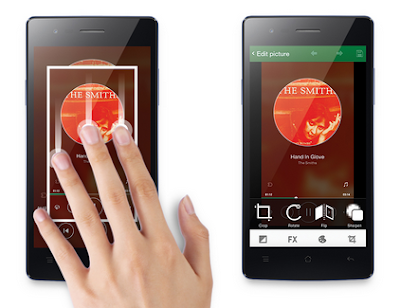
Pada bagian dapur pacunya, ponsel oppo neo 5 ini sudah dibekali dengan processot quad core yang mengsusung kecepatan 1.2 GHz serta GPU Adreno 305 untuk menunjang kualitas grafis. Namun ada hal yang patut disayangkan pada smatphone oppo neo 5 ini, yakni terletak pada system operasi yang masih menggunakan android jelly bean seperti smartphone terbaru pada umumnya yang sudah menggunakan OS android kitkat dan lollipop.
Nah, mungkin anda berminat untuk memiliki handphone oppo yang satu ini. Maka dari itu sebelum anda memutuskan untuk membelinya secara langsung ditoko terdekat, alangkah baiknya jika sebelumnya anda melihat detail spesifikasi HP oppo neo 5 di bawah ini:
Spesifikasi HP Oppo Neo 5
- Body
- Dimensions : 132 x 65.8 x 9.2 mm
- Weight : 132.5 g
- SIM : Yes
- Type : IPS LCD capacitive touchscreen, 16M colors
- Size : 4.5 inch
- Memory
- Card slot : microSD, up to 32 GB
- Internal : 4 GB, 1 GB RAM
- Kamera
- Primary : 5 MP, 2592 ? 1944 pixels
- Features : Geo-tagging, panorama, HDR, LED flash
- Video : Yes
- Secondary : 2 MP
- Platform
- OS : Android OS, v4.3 (Jelly Bean)
- Chipset : Qualcomm Snapdragon 400
- CPU : Quad-core 1.2 GHz Cortex-A7
- GPU : Adreno 305
- Fitur Lain
- WLAN : Wi-Fi 802.11 b/g/n, Wi-Fi Direct, hotspot
- Bluetooth : v4.0, A2DP
- GPS : Yes, with A-GPS
- Radio : FM radio
- USB : microUSB v2.0, USB Host
- Pilihan Warna Oppo Neo 5 : Black, white
- Baterai : Li-Ion 1900 mAh
Video HP Oppo Neo 5 4G LTE
Harga HP Oppo Neo 5

Smartphone oppo neo 5 ini memiliki kapasitas RAM sebesar 1 GB yang dapat digunakan untuk menopang segala aktifitas mobile anda. Selain itu, dengan adanya RAM ini akan mempermudah anda dalam menjalankan semua aplikasi android secara multitasking, sehingga anda akan merasakan pengalaman menarik ketika menggunakan oppo neo 5. Kemudian pada sisi baterainya, HP Oppo Neo 5 menggunakan baterai tipe Li-Ion 1900 mAh.
Handphone Oppo Neo 5 ini memang sebenarnya disasarkan untuk masyarakat kalangan menengah kebawah. Sehingga untuk dapat memiliki oppo smartphone neo 5 anda perlu mengeluarkan uang sebesar :
- Harga HP Oppo Neo 5 Baru : Rp 1.800.000
- Harga HP Oppo Neo 5 Bekas : Rp 1.500.00
- Harga HP Oppo Neo 5 Hari Ini : Klik DISINI
Demikianlah ulasan mengenai harga oppo smartphone. Semoga dengan adanya review harga hp oppo neo 5 LTE terbaru ini bisa membantu sekaligus menjadi referensi bagi yang memerlukan. Terima kasih karena sudah mengunjungi blog Agan Gadget untuk menemukan info daftar harga dan spesifikasi HP. Jumpa lagi di lain kesempatan.
download file now

Sunday, 24 September 2017
Neo 7 Oppo Tested flash file Free Download
Neo 7 Oppo Tested flash file Free Download
Neo 7 Oppo Tested flash file Free Download
Important Notice: Take a backup of your personal data before flashing or installing the firmware of your smart Phone or keypad mobile. As this helps you to recover the personal data whenever anything wrong happens.
Download
download file now
Monday, 18 September 2017
How to flashing oppo neo via sdcard
How to flashing oppo neo via sdcard
Androzero | How to Flashing Oppo Neo via sdcard. Hello Androzero-friend, how are you? on this occasion a-ndroid will share a tutorial on how to flashing oppo Neo via sdcard, so my friends do not have to bother anymore flash wear pc, Do, smartphone oppo buddy was having bootloop? Bootloop is a condition where the smartphone can not get into the android system (if we turn on only until the beginning logo only). This happens because bootloop (flashing failed, failed a custom rom, os which have been modified).
androzero will help solve the problems on the Oppo smartphone through a tutorial how to flashing oppo Neo via sdcard, you just follow coherently and correctly tutorial how to flashing oppo Neo via sdcard, firmware we provide is a firmware update, please friend see how to tutorial flashing oppo Neo via sdcard follows.

Flashing tools oppo Neo :
- Firmware oppo Neo (Color Os), Here
How to Flashing oppo Neo :
- Please download the materials on top,
- then follow the steps copy the downloaded file format with the "zip" to Sd.
- please mate Smartphone Turn off, and go into recovery mode by pressing (Vol Down + Power).
- Press Home until the display changes to the language selection mode. (Select English)
- Select "Wipe Data and Cache" first. wait until the process is complete.
- Select mode "Install From Sd Card", find the firmware file to zip format that has been copied to the sd card is. (If the correct flash process will run. Wait a few minutes).
- If completed then select "Reboot".
- Smartphone will include entry to the Home screen, the process is somewhat lengthy
- Finish
Hopefully tutorial how to flashing oppo Neo via sdcard can help my friend, Ill see you in the next tutorial.
download file now
CUSTOM Rom Samsung Galaxy s4 neo lenovo a369i and mt6572
CUSTOM Rom Samsung Galaxy s4 neo lenovo a369i and mt6572
Assalamualaikum wr wb.
ABOUT ZENFONE - CUSTOM Rom Samsung Galaxy s4 neo lenovo a369i and mt6572, Hi amatnewbe will share the rom link of Samsung Galaxy s4 neo to hh lenovo a369i you and also to chjipset mt6572 but must port first hehe: v: v: v .... how to custom appearance rom? Do not worry about the appearance of this custom rom really look like with samsung galaxy S4 so for my friend who want to buy S4 ngak nah mending to make because the price is quite waw buddy just install this rom just is not much different kok with the original ... hayoo curious ya ni penampakanya Amatnewbe liatin ...


Cool is not, this rom in the port by mbah ats vutra nah for you who want to try it please download below.
SHORT FEATURES SIMAH MBAH:
- SUP Dolby
- Smooth for sure
- Dual 3G work fast
- Multitasking game ok
- Samsung uNIX Fonts
- Battery economical let alone mode no data fly hehe..fix 12 mp camera Clear ..
- DLL DLL feel yourself
** NI rom already support dolby
DWYOR
(Any damage is not my responsibility)
DWYOR
(Any damage is not my responsibility)
LINK ROM:
[DOWNLOAD]
LINK EXPRESS PORT:
[LIHAT SINI]
BACKUP SELALU
INSTALL STEPS:
- Go cwm do 3 wipe
- Wipe data, cache, and dalvik
- Install rom
- Install express port as per your row
- Rebbot and enjoy this rom
Credit thanks:
= Allah SWT, Prophet mUhammad SAW, family of friends
= Lenovo user indonesia Admin and member
= Evass A7s *
= All MTK dev mod
= ATS vutra
= All android groups, forums of web blog groups in the world and elsewhere, who can not forget it can be edited n PM later hehe ...
Wassalamualaikum wr wb.
download file now
Wednesday, 13 September 2017
How to flashing oppo neo 7 via sdcard
How to flashing oppo neo 7 via sdcard
Androzero | How to Flashing Oppo neo 7 via sdcard. Hello Androzero-friend, how are you? on this occasion a-ndroid will share a tutorial on how to flashing oppo neo 7 via sdcard, so my friends do not have to bother anymore flash wear pc, Do, smartphone oppo buddy was having bootloop? Bootloop is a condition where the smartphone can not get into the android system (if we turn on only until the beginning logo only). This happens because bootloop (flashing failed, failed a custom rom, os which have been modified).
androzero will help solve the problems on the Oppo smartphone through a tutorial how to flashing oppo Neo 7 via sdcard, you just follow coherently and correctly tutorial how to flashing oppo Neo 7 via sdcard, firmware we provide is a firmware update, please friend see how to tutorial flashing oppo Neo 7 via sdcard follows.

Flashing tools oppo neo 7 :
- Firmware oppo Neo 7 (Color Os), Here
How to Flashing oppo Neo 7:
- Please download the materials on top,
- then follow the steps copy the downloaded file format with the "zip" to Sd.
- please mate Smartphone Turn off, and go into recovery mode by pressing (Vol Down + Power).
- Press Home until the display changes to the language selection mode. (Select English)
- Select "Wipe Data and Cache" first. wait until the process is complete.
- Select mode "Install From Sd Card", find the firmware file to zip format that has been copied to the sd card is. (If the correct flash process will run. Wait a few minutes).
- If completed then select "Reboot".
- Smartphone will include entry to the Home screen, the process is somewhat lengthy
- Finish
Hopefully tutorial how to flashing oppo Neo 7 via sdcard can help my friend, Ill see you in the next tutorial.
download file now
Monday, 11 September 2017
CARA FLASH OPPO NEO A37 VIA FLASHTOOL TERLENGKAP
CARA FLASH OPPO NEO A37 VIA FLASHTOOL TERLENGKAP

- Berikut yang harus di siapkan sebelum Flashing Oppo Neo9 A37

- FLASHTOOL
- MTK DROID TOOL AND ROOT
- MT65XX USB DRIVER
- MTK6577 USB VCOM DRIVER
- STOCK ROM Oppo Neo9 A37
- ALL STOCK ROM FIRMWARE OPPO
TUTORIAL FLASHING
- INSTALL DRIVER
- EXTRAK STOCK FIRMWARE Oppo Neo9 A37
- JALANKAN FLASHTOOL EXE
- PADA SCATTER LOADING FILE,ARAHKAN KE FILE SCATTER YANG TERDAPAT DI STOCK ROM YANG TADI DI PILIH DOWNLOAD DAN SUDAH DI EXTRAK PAKAI WINRAR TADI
- PRELOADER JANGAN DI CENTANG
- KLIK DOWNLOAD PADA SP FLASHTOOL
- MATIKAN HP Oppo Neo9 A37,LALU HUBUNGKAN KE KOMPUTER DENGAN MEMAKAI KABEL USB
- TUNGGU PROSES LOADING JALAN DI FLASHTOOL HINGGA ADA LINGKARAN HIJAU TANDA SELESAI.
CATATAN!!!!!!!
Jika mengalami kegagalan flashing pastikan anda mendownload file stock rom serta versi flashtool yang benar, Anda dapat menggulang dari awal jika terjadi kegagalan proses flashing update pada oppo. pastikan tidak ada gangguan selama proses flashing seperti kabel tersenggol ada kendala yang membuat flashing terputus di tengah jalan. selamat mencoba
- TAG :OPPO
download file now
Saturday, 9 September 2017
Download Firmware Oppo Neo 3
Download Firmware Oppo Neo 3
After years of waiting finally Shadow Fight 3 APK MOD from Nekki arrived on Android. Shadow Fight 3 APK is a sequel to hit shadowic silhouette styled fighting game from same developers. Its second part you must have at least tried once because of its amazing skilled based fighting 2D gameplay with some RPG touch. From the dark 2D to colorful 3D style gameplay Shadow Fight 3 APK changed a lot. What we still gotten so far is that smooth gameplay with real nice online features. One of the great feature is that Shadow Fight 3 is still an offline game. SF3 MOD APK is added offering Unlimited Gold Coins and Gems.

Shadow Fight 3 APK MOD Android Unlimited Money 1.0.1
We all have seen the trailer of APK Shadow Fight 3 and it looked drastically amazing. from 3D animations to fighting styles and characters beautifully rendered in 3D it looks great. since its a freemium game you will have to grind for some money and upgrade your characters of course. official release date is near till then enjoy the close beta release. Its not just a fighting game but its a blended RPG as well because at the beginning you will have to choose from 3 characters Legion, Dynasty, or Heralds. you can customize your characters as well.
Money or in game currency is the second thing in the game.you can earn it through Story MODE or different challenges. you can expect MOD HACK APK of Shadow Fight 3 in near future with Unlimited money GOLD Coins etc etc. In just minimalist size we got huge fun from SF3 and all credit goes to nekki for such an amazing charismatic game. Game is running on 60 FPS with no bugs and all the action sequences looks smooth. graphics is the key part here because in SF2 we dint get such graphics because it was just shadow and nothing more but in shadow fight 3 we have beautiful positive looking graphics and amazing backgrounds. Musics and sound effects are top notch. overall all the wait for SF3 is worth it.we have got such a pleasurable fighting offline game.
Each character has its own skills and customization. play through stages and defeat enemies to collect more collectibles which can be used to customize and upgrade your characters more easily. in Shadow Fight 3 MOD APK we have got bran new storyline that gets 10 years after the occasions of the second part of the game. There are around hundreds of armors and equipment you can collect from different quests and events. Nekki has developed such an amazing game for mobile games and they have put a lot of hours in development and you can see it while playing the game. if you are a fan of Shadow Fight 2 then you must play SF3 right now.
What�s In The Shadow Fight 3 MOD APK: Unlimited Currencies(Increases instead of decreasing)
Install SF3 APK,Place data in Android/Obb/ and Play.
1.)Download TunnelBear from the play store.
2.)Register in TunnelBear and Login with your ID. You will get free 500 MB to spend every month.
3.)Now select USA in the server and press start.Now you are in USA.
4.)Now try to Play Shadow Fight 3. Hopefully this will fix errors like UPDATE TO LATEST VERSION,Asking for BETA EMAIL or BETA KEYS.
Get Full Free Shadow Fight 3 APK MOD Data Android Unlimited Money DOWNLOAD
download file now
Friday, 8 September 2017
DOWNLOAD OPPO A33F NEO 7 STOCK ROM
DOWNLOAD OPPO A33F NEO 7 STOCK ROM
Below is the direct link to download the Oppo A33F Neo 7 Stock ROM (Firmware).

Note:
[*] Follow the instructions on how to flash this device carefully, I will not take responsibility on whatever may happen to your device.
Make sure you are downloading the exact ROM of the device you want to flash because flashing a wrong preloader, will make the device completely dead (cant power on, cant charge and will not be detected by a computer).
| OPPO A33F NEO 7 SPECS | ||||||||||||||||
|---|---|---|---|---|---|---|---|---|---|---|---|---|---|---|---|---|
|
| OPPO A33F NEO 7 STOCK ROM |
|---|
Oppo_A33F_Neo_7_EX_11_A.17_160914 DOWNLOAD ROM |
STEP 1. Download & extract the Stock ROM (Firmware) on your computer. STEP 2. Install the USB Drivers (skip this step if drivers are already installed). STEP 3. After extracting you will find the Firmware, Driver and instruction manual. STEP 4. Follow the manual to flash the firmware on your device. |
|
Please Leave a comment after using this ROM
Report it you cannot download this file.
Any donation to support this site is highly appreciated!
download file now
Tuesday, 5 September 2017
How to flashing oppo neo 3 via sdcard
How to flashing oppo neo 3 via sdcard
Androzero | How to Flashing Oppo Neo 3 via sdcard. Hello Androzero-friend, how are you? on this occasion a-ndroid will share a tutorial on how to flashing oppo Neo 3 via sdcard, so my friends do not have to bother anymore flash wear pc, Do, smartphone oppo buddy was having bootloop? Bootloop is a condition where the smartphone can not get into the android system (if we turn on only until the beginning logo only). This happens because bootloop (flashing failed, failed a custom rom, os which have been modified).
androzero will help solve the problems on the Oppo smartphone through a tutorial how to flashing oppo Neo 3 via sdcard, you just follow coherently and correctly tutorial how to flashing oppo Neo 3 via sdcard, firmware we provide is a firmware update, please friend see how to tutorial flashing oppo Neo 3 via sdcard follows.

Flashing tools oppo Neo 3 :
- Firmware oppo Neo 3 (Color Os), Here
How to Flashing oppo Neo 3 :
- Please download the materials on top,
- then follow the steps copy the downloaded file format with the "zip" to Sd.
- please mate Smartphone Turn off, and go into recovery mode by pressing (Vol Down + Power).
- Press Home until the display changes to the language selection mode. (Select English)
- Select "Wipe Data and Cache" first. wait until the process is complete.
- Select mode "Install From Sd Card", find the firmware file to zip format that has been copied to the sd card is. (If the correct flash process will run. Wait a few minutes).
- If completed then select "Reboot".
- Smartphone will include entry to the Home screen, the process is somewhat lengthy
- Finish
Hopefully tutorial how to flashing oppo Neo 3 via sdcard can help my friend, Ill see you in the next tutorial.
download file now
Monday, 4 September 2017
Download Firmware Oppo Neo
Download Firmware Oppo Neo
This War of Mine MOD APK+DATA 1.4.3 TWoM APK 1.5.0 Mobile New DLC Update Unlocked 1.4.3 Child Characters DLC Unlocked Anniversary Edition added.

This war of mine is An Adventure android game. Based on true events this game is a masterpiece survival.the small media circus that there was publicizing the launch of this war of mine painted it as an anti-war game casting you is somewhat helpless as a civilian caught between a bitter feud somewhere in eastern europe so maybe comparisons with papers please what exactly seem unreasonable here besides being an entirely different genre papers please had a sense of humor, and style to it that kinda disarmed customers for twists that happened after launch even after all the brutal istic family death messages have the early game it took me about five hours or me to finally notice just how much the gameplay itself was a part of that same message for me did say wow playing this game is frustrating disempowering in fruitless. This war of mine APK+DATA 1.4.3 with data files for All devices offline Android. in the same way that employment under a failing to tell it a reinstate might see this word mine wants to advertise that West up front actually be which means that if the twist is there an RT got spoiled and what makes those anti-war press releases and news headlines even more the circus is that the gameplay mechanics here. this is despite what it may lead you to believe that very much a game about expanding your territory eliminating your enemies manipulating the market. in stripping this map clean that�s naturally occurring resources.see the people you�re going to be playing as in this game don�t look like. You�re not trying to eke out a normal life in the midst of wartime and it�s hard to imagine your characters really fitting and and knock US description of the word civilian because the people that do are the people you�re gonna be robbing from that�s the tragic twist the mechanics that rationalize the implied moral fail. new update of war of mine arrived 1.3.9 with bug fixes and gameplay improvments.
What�s In The MOD APK: Unlocked DLCs
Install APK,Place data folder in Android/Obb/ and play.
Get Full Free This War of Mine MOD APK DATA DLC Unlocked DOWNLOAD
download file now
Sunday, 27 August 2017
Download Firmware Oppo Neo 9 A37F
Download Firmware Oppo Neo 9 A37F
Download Firmware Oppo Neo 9 A37F - Halo semuanya, selamat data diblog kesayangan Silveriumz, pada kali ini admin mau share lagi untuk pengguna smartphone oppo yang sedang mencari Firmware Oppo Neo 9 A37F yang tentu saja bisa kalian dapatkan disitus ini. Pengguna oppo neo 9 memang bisa saja mendapatkan masalah bootloop dan sebagainya, oleh karena itu harus segera di flash supaya hp android tersebut normal kembali.
Cara Flash Oppo Neo 9 A37F ini bisa dilakukan dengan mudah karena ada banyak blog yang memberikan tutorial flashing, tetapi anda tidak perlu khawatir karena selain saya memberikan Firmware Oppo A37F saya juga akan memberitahu kepada kalian bagaimana cara flashing oppo neo 9.
 Tetapi jika kalian sedang mencari Firmware Oppo A37F Original namun hp kalian biasa-biasa saja alias tidak ada masalah mungkin bisa saja anda ingin mengupgrade versi color os pada hp oppo neo 9 tersebut, nah saya juga akan memberikan kalian cara upgrade firmware oppo smartphone dengan mudah dan ada 2 metode yaitu kita bisa melakukannya lewat Pembaruan System Oppo Smartphone lalu siapkan juga stock rom oppo neo 9 a37f dan meletakannya pada SdCard lalu silahkan ikuti langkah-langkah yang diberikan.
Firmware Oppo Lainnya :
Download Firmware Oppo Joy 3 A11w MT6582
Download Stock Rom Oppo R1001 Original
Untuk metode yang kedua kita bisa menggunakannya melalui Recovery Smartphone, dan biasanya pada cara ini sering dilakukan oleh pengguna oppo a37f yang bootloop dan harus di flashing. Nah berikut dibawah ini Cara Flash Oppo Neo 9 A37F dengan mudah.


Cara Flash Oppo Neo 9 A37F ini bisa dilakukan dengan mudah karena ada banyak blog yang memberikan tutorial flashing, tetapi anda tidak perlu khawatir karena selain saya memberikan Firmware Oppo A37F saya juga akan memberitahu kepada kalian bagaimana cara flashing oppo neo 9.
Firmware Oppo Lainnya :
Download Firmware Oppo Joy 3 A11w MT6582
Download Stock Rom Oppo R1001 Original
Untuk metode yang kedua kita bisa menggunakannya melalui Recovery Smartphone, dan biasanya pada cara ini sering dilakukan oleh pengguna oppo a37f yang bootloop dan harus di flashing. Nah berikut dibawah ini Cara Flash Oppo Neo 9 A37F dengan mudah.
Cara Flash Oppo Neo 9 A37F Via Flash Tool
- Download semua file dibawah kemudian ekstrak
- Selanjutnya instal Driver dan juga Flashtool
- Buka SP Flashtool yang terdapat di dalam folder hasil ekstrak,kemudian pada Tab "Scatter Load" klik dan arahkan ke file firmware yang berada di dalam folder hasil ekstrak jika sudah ketemu klik open
- Jika file Scatter sudah di masukkan ke flashtool selanjutnya pada Tab Flashtool tekan tombol "Download" maka akan secara otomatis scatter termuat oleh flashtool dan pastian semua tercentang kecuali untuk preloader sebaiknya centangnya dibuang saja.kecuali jika gagal baru preloader di centang dan ulang kembali.
- Selanjutnya persiapkan Hp Oppo Neo 9 atau A37 yang akan kita flash dalam kondisi mati,untuk memastikan Hp benar benar mati sebaiknya lepas baterai diamkan beberapa detik kemudian pasang kembali
- Kemudian hubungkan "Hp Oppo Neo 9 ke PC" menggunakan "USB" sebaiknya menggunakan usb yang ori,atau paling tidak gunakan USB yang masih bagus sambil menekan "Tombol Volume Up + Power"
- Pastikan driver sudah benar benar teinstal di PC agar Devices terdeteksi oleh Flashtool
- Jika sudah terdeteksi maka secara otomatis flashtool melakuan tugasnya flash atau instal ulang firmware Oppo Neo 9.
- Tunggu hingga proses flashing selesai,biasanya proses flashing membutuhkan waktu sekitar 5-8 menit,porses flashing selesai akan muncul tanda "Download OK" berwarna hijau.
- Kalau sudah selesai maka Devices akan otomatis "Reboot atau Restart" tunggu hingga booting selesai biasanya agak lama,jadi bersabar sedikit
- Jika gagal mungkin karena kalian tidak mengikuti tutorial diatas, dan harus ulangi dengan baik dan benar seperti yang telah saya berikan.
Nah bagaimana Cara Flash Oppo Neo 9 A37F yang saya berikan ini sangat bermanfaat sekali bukan, sekarang hp oppo kalian telah sukses diflashing menggunakan Stock Rom Oppo Neo 9 A37F Original dari saya, terima kasih.
Download
SP Flash Tool V5
Driver Mediatek
USB VCom Auto Installer
Firmware Oppo Neo 9 A37F
download file now
Friday, 25 August 2017
Cara software oppo neo 5 1201 Tanpa pc 100 work
Cara software oppo neo 5 1201 Tanpa pc 100 work

Assalamuallaikum....
Ok Sobat para blog setiaku, kali ini ane mau share cara software oppo yang terbilang sangat Mudah..
Download ==> software oppo neo 5 1201
langkah flashing........
* Simpan softwarenya di luar folder sdcard
* Matikan hh anda dan diamkan dulu selama 5 detik
* kmudian nyalakan kemballi dengan menekan secara bersamaan tombol (power+volume atas)
* Setelah masuk di menu recovery
pilihan....
* bahasa indonesia
* wipe data dan cache
* install from SD
* from SD
* file zip (software oppo neo 5 1201) yang anda simpan di luar folder sdCard
Proses instalan sedang berjalan, jangan lupa minum kopy + Rokok sambil menunggu proses instalan
taraaaaaaaaaa, bagaimana sangat mudah bukan..
kritik dan saran anda jangan lupa yaaa....
Trimkasih smoga bermanfaat!
Wasalam......
download file now
Monday, 21 August 2017
Download Firmware Oppo Neo 7
Download Firmware Oppo Neo 7
Download Full Free GTA Philippines v1.0 Apk + OBB Data [Full] � Android Games by GTA Pinas.

You are about to download the latest GTA Philippines 1.0 apk for Android 2.3 and up from web With Direct Link. GTA Philippines APK v1.0 Download is Adventure Game. Full APK Modded version download free for your android phone and tablet. PROJECT PHILIPPINES MOD PACK BY GUILLER BACOCANAG
Features:
* BIKES
- Pedicab (Mountain bike)
- Honda scoopy (faggio)
- Kawasaki barako 175 jollibee delivery (pizzaboy)
- Ghost rider bike (Freeway)
- Honda wave 125 (fcr-900)
- yamaha r1000 (hpv1000)
- suzuki raider/reborn 150 (nrg-500)
- suzuki raider dragbike (pcj-900)
- Tricycle (Quadbike)
* CARS
- Philippine army truck (barracks)
-Gmc pick up (bobcat)
- Toyota hiace uv express (boxburg)
- Lgs motors egg type JEEPNEY (boxville)
- Bmw z4 (bravura)
- Mitsubshi mirrage (broadway)
- Chevrolet camaro (buffalo)
- Dodge viper (bullet)
- Hataw motors JEEPNEY with passengers (burrito)
- Santrans bus (bus)
- hyundai accent Efe taxi (cabbie)
- lexus (cheetah)
- Isuzu cement truck (cement truck)
- Mazda rx7 (clover)
- Mini copper (club)
- Philtranco bus (dft30)
- Lamborghini aventador PULIS (enforcer)
- Lamborghini gallardo wth spoiler (esperanto)
- Mitsubshi eclipse (flash)
- Nissan dumptruck (flatbed)
- HOnda accord (greenwood)
- Alipores JEEPNEY patok (hotknife)
- Chevrolet captiva (huntley)
- Porche carrera gt (infernus)
- kia sportage (landstalker)
- Auto pormado zyranomics v2 JEEPNEY (mesa)
- Dodge big type (majestic)
- Tv5 newsvan (newsvan)
- Scania truck coca cola (tanker)
- Klockworx patok without passengers JEEPNEY (pony)
- Ford explorer (solair)
- Dodge 4�4 (stafford)
- Mitsubishi lancer (sultan)
- Toyota vios (sunrise)
- Aurelio prototye (turismo)
- Lamborghini egoista (zr350)
- Coca cola trailer truck (artict2)
- Petron truck (petrol truck)
- Philippine tank (rhino)
*BOATS
- BRP GREGORIO DEL PILAR (MARQUIS)
*Planes
- Philippine c130 (andromada)
- Philippine airlines (at � 400)
- Cebu pacific (rustler)
*TRAIN
- Philippine lrt
*SKIN
- Presidente Rodrigo duterte (Rodrigo duterte)
- swagger tamvan v2 (swagger)
- Deadpool skin (deadpol)
- Kim domingo (kim domingo)
*Buildings
- Jollibee
- Mcdonald
- Mang inasal
- Chowking
- robinson
- Sm davao
- cdr king
- greenwich
- bench
- Generic pharmacy
- lbc
- petron gas station
- shell gas station
- Bdo
- gerry grill
- Mall of asia arena
Freebies
*Modded handling.cfg
*Modded vehicle.ide
*Wheels changed
*Hd textures trees
*Hd radar
*Loading screen ( philippine style )
*Exotic timecycle (Di ko muna nilagyan ng skybox)
How to Install the OBB File (APK Expansion File):
Firstly, Download APK file of the app GTA Philippines 1.0 for Android.
Copy the APK file to your Android device�s SD card and Install it. (Don�t open it after installation)
Download Obb files and copy the *.obb file named �main.xxx.com.rockstargames.gtasa.obb� into the required location:
/SDCARD/Android/obb/com.rockstargames.gtasa/
The full/absolute path of the obb file should look like as the following (Case-sensitive):
/SDCARD/Android/obb/com.rayark.pluto/main.xxx.com.rockstargames.gtasa.obb
Get Full Free GTA Philippines Apk OBB Data Full Android Game DOWNLOAD
download file now
Tuesday, 8 August 2017
Neo 5 Oppo Tested flash file Free Download
Neo 5 Oppo Tested flash file Free Download
Neo 5 Oppo Tested flash file Free Download

Take a backup of your personal data before flashing or installing the firmware of your smart Phone or keypad mobile. As this helps you to recover the personal data whenever anything wrong happens.

download file now
Subscribe to:
Posts (Atom)