Showing posts with label ot. Show all posts

Tuesday, 22 August 2017

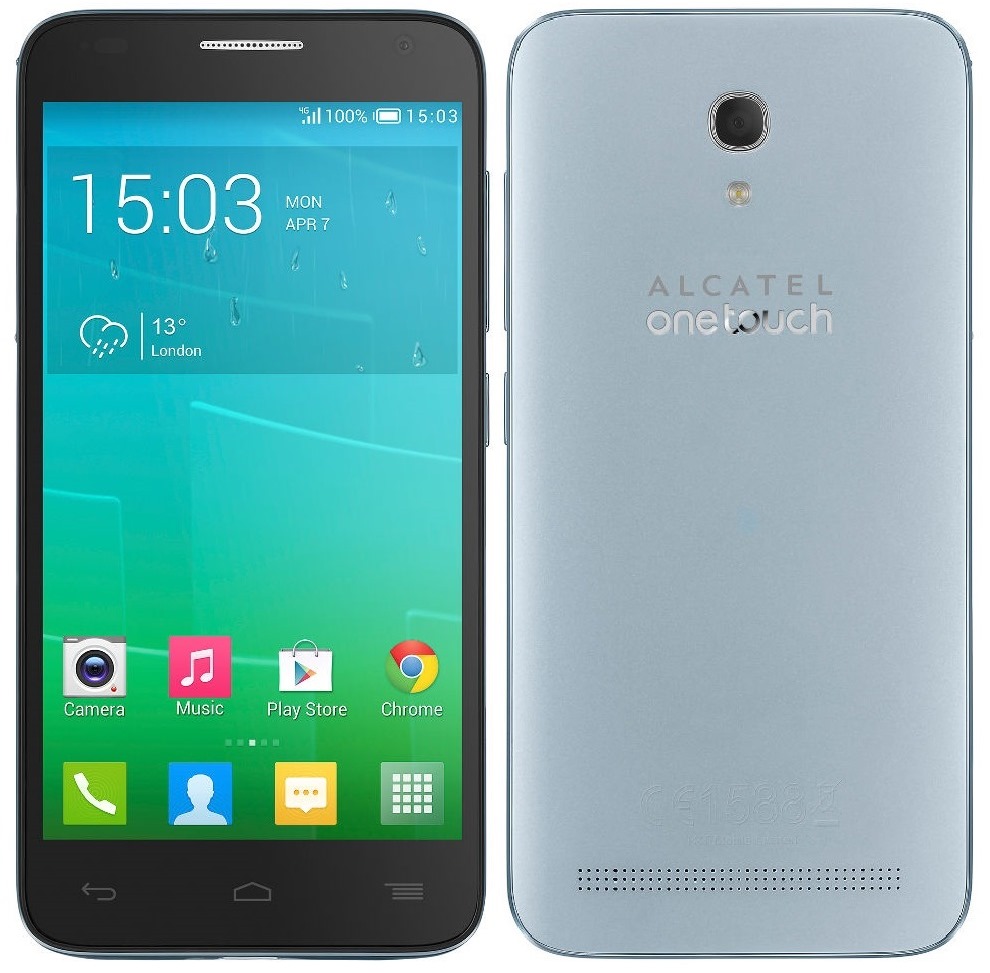
ALCATEL OT 6036Y Idol 2 mini S Firmware Flash Free

ALCATEL OT 6036Y Idol 2 mini S Firmware Flash Free


ALCATEL OT-6036Y Idol 2 mini S Firmware Flash File

ALCATEL OT-6036Y Idol 2 mini S Firmware Flash File

First step to Install Firmware

  1. Download and install MTK  android USB drivers
  2. Download And Install SP Flash Tool

How To Flash ALCATEL OT-6036Y Idol 2 mini S

  1. First, you need to download and install sp flash tool
  2. Download and install MTK  android USB drivers
  3. Then download Firmware file/Flash file/Rom for your phone
  4. Your phone must have 50 % charging before this process
  5. switch off yourmobile remove the battery (if removable) reinsert the battery and plug the USB cable in charging socket
  6. Now open SPflash tool.exe
  7. When sp flash tool open, go to download button in sp flash tool
  8. In download tab, click on scatter load button
  9. After locating the scatter tab, click on the download button
  10. Now connect your smart phone with a USB cable and press volume up or volume down key for easy detection (remove and re insert your phone battery if it is removable)
  11. Now flashing is completed, a green ring will appear in sp flash tool
  12. Close sp flash tool on your computer and unplug phone
  13. Power on the phone and enjoy
Download Link

download file now

Read more »

Sunday, 20 August 2017

Digicel DL9004 Alcatel OT 7041D PopC7 Firmware ROM

Digicel DL9004 Alcatel OT 7041D PopC7 Firmware ROM


Back Cover /housing 


Firmware Rom is backup using NCK Mediatek Tool.
The figure image on top picture shows the actual unit of actual device i repaired
This Digicel DL9004 problem of unlocking SIM network, then after successful unlocked, I back-up the ROM.

The Digicel DL9004 Alcatel OT-7041D PopC7 ROM is backup as scatter file
can be flash back using any Mediatek tool and can be flash back using any Mediatek tool that support scatter base loader.
ROM support scatter base file like SP flash Tool below link.

How to Flash Firmware step by step procedure

Firmware can use to same model about have problem about software related problem Hang, no power, password, pattern lock , infected by virus, anything about software related.
Best safe way is manual select flash the SYSTEM ANDROID file only.
Do it at your own risk, After flashing ! the device is set automatic in reset condition, All user data is lost.
Make sure to back-up first before to proceed flashing your phone.


Download scatter file
MT6582_Alcatel_OT-7041D_PopC7_Digicel_DL900 4.4.2.rar

Rar password
VIEW Text

NVRAM Download
Report Broken Link! Admin will try to fix it.

download file now

Read more »

Saturday, 12 August 2017

Alcatel OT 6030X One Touch Idol Firmware Flash File Free

Alcatel OT 6030X One Touch Idol Firmware Flash File Free


Alcatel OT-6030X One Touch Idol Firmware Flash File

Alcatel OT-6030X One Touch Idol Firmware Flash File

First step to Install Firmware

  1. Download and install MTK  android USB drivers
  2. Download And Install SP Flash Tool

How To Flash Alcatel OT-6030X One Touch Idol

  1. First, you need to download and install sp flash tool
  2. Download and install MTK  android USB drivers
  3. Then download Firmware file/Flash file/Rom for your phone
  4. Your phone must have 50 % charging before this process
  5. switch off yourmobile remove the battery (if removable) reinsert the battery and plug the USB cable in charging socket
  6. Now open SPflash tool.exe
  7. When sp flash tool open, go to download button in sp flash tool
  8. In download tab, click on scatter load button
  9. After locating the scatter tab, click on the download button
  10. Now connect your smart phone with a USB cable and press volume up or volume down key for easy detection (remove and re insert your phone battery if it is removable)
  11. Now flashing is completed, a green ring will appear in sp flash tool
  12. Close sp flash tool on your computer and unplug phone
  13. Power on the phone and enjoy
Download Link

download file now

Read more »

Wednesday, 2 August 2017

Alcatel OT one Touch 5022X MT6580 Firmware Free

Alcatel OT one Touch 5022X MT6580 Firmware Free


Alcatel OT one Touch 5022X MT6580 Firmware Flash File

Alcatel OT one Touch 5022X MT6580 Firmware Flash File

First step to Install Firmware

  1. Download and install MTK  Android USB drivers
  2. Download And Install SP Flash Tool

How To Flash Alcatel OT one Touch 5022X

  1. First, you need to download and install sp flash tool
  2. Download and install MTK  Android USB drivers
  3. Then download Firmware file/Flash file/ROM for your phone
  4. Your phone must have 50 % charging before this process
  5. switch off your mobile remove the battery (if removable) reinsert the battery and plug the USB cable in charging socket
  6. Now open SPflash tool.exe
  7. When sp flash tool open, go to download button in sp flash tool
  8. In download tab, click on scatter load button
  9. After locating the scatter tab, click on the download button
  10. Now connect your smartphone with a USB cable and press volume up or volume down key for easy detection (remove and re-insert your phone battery if it is removable)
  11. Now flashing is completed, a green ring will appear in sp flash tool
  12. Close sp flash tool on your computer and unplug phone
  13. Power on the phone and enjoy
  14. After flashing process starts, it might take up to 5-10 minutes. So keep patience and wait.
  15. See detailed Instruction MT flashing sp tool with images


Download Link

download file now

Read more »