Showing posts with label u. Show all posts

Thursday, 31 August 2017

Wiko U Feel MT6735 Android 6 01 Firmware Flash File Free

Wiko U Feel MT6735 Android 6 01 Firmware Flash File Free


Image result for Wiko U Feel

Wiko U Feel MT6735 Android 6.01 Firmware
h File

download file now

Read more »

Tuesday, 29 August 2017

DOWNLOAD SONY XPERIA U ST25 STOCK FIRMWARE

DOWNLOAD SONY XPERIA U ST25 STOCK FIRMWARE


Learn how to unbrick/flash or upgrade this device using flashtool from here

Note
Follow the instructions on how to flash the device carefully from the link above
I will not take responsibility on whatever may happen to your device.

Make sure you are downloading the exact Firmware of the device you want to flash because
 flashing a wrong Firmware, will make the device completely dead
(cant power on, cant charge and will not be detected by a computer)


SONY XPERIA U ST25 STOCK FIRMWARE

Android version 2.3.7 gingerbreadLanguage - All
Size - 266Mb
DOWNLOAD


Learn how to unlock & relock your Sony Xperia bootloader here

Get other Sony Xperia Stock Firmwares from here


Please Leave a comment after using this Stock Firmware
Report if you cannot download this file.

download file now

Read more »

Tuesday, 22 August 2017

Wiko U Feel Prime Android 6 0 1 Firmware Flash File Free

Wiko U Feel Prime Android 6 0 1 Firmware Flash File Free


Wiko U Feel Prime Android 6.0.1 Firmware Flash File

Wiko U Feel Prime Android 6.0.1 Firmware Flash File

First step for Installing Rom

  • Download and install QPST 2.7.422 with QFIL
  • Download and install Qualcomm USB Drivers.

How To Flash ROM Wiko U Feel Prime 

  1. Download and install QPST 2.7.422 with QFIL and Qualcomm USB Drivers.
  2. Turn off the phone. Hold Vol+ button and plug-in USB Cable. The phone will vibrate one time; the screen will be black. It�s Download Mode.
  3. There should be the device called in device management:
  4. Qualcomm HS-USB QDLoader 9008 (COMXX)
  5. In any other case, you have to install drivers manually.
  6. Run QFIL.
  7. Click Browse in Programmer Path and choose prog_emmc_firehose_8916.mbn
  8. Load XML in Download Section:
  9. First select RawProgram File: rawprogram0.xml
  10. then Select Patch File: patch0.xml
  11. Check all inputs is correct and click Download under Load XML button and wait about 5 to 10 minutes:
  12. After flashing process starts, it might take up to 5-10 minutes. So keep patience and wait
  13. See detailed Instruction Qualcomm flashing  QPST tool with imges


Download Link

download file now

Read more »

Monday, 21 August 2017

Average U S Internet Access Speeds are Highly Dynamic

Average U S Internet Access Speeds are Highly Dynamic


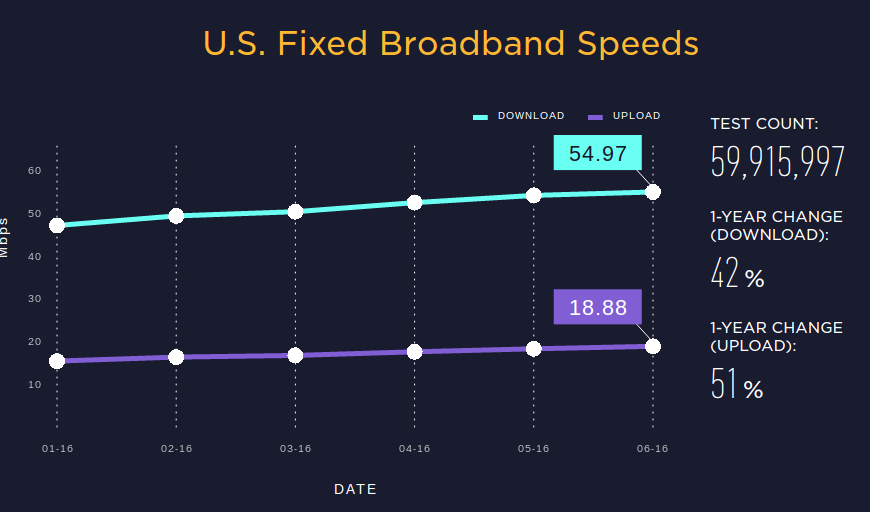
If in the second quarter of 2016, average connection speeds in U.S. cities ranged from 17 Mbps to 24 Mbps, while Internet service providers are selling gigabit access, as well as services in the 100 Mbps to 300 Mbps range, it is obvious that most consumers are not buying either gigabit or hundreds-of-megabits services.

On the other hand, speeds are increasing rapidly. In fact, according to Okla, fixed network customers in the first half of 2016 got an average of over 50 Mbps for the first time ever.

That represents a speed improvement of more than a 40 percent since July 2015.

Similarly, mobile Internet access customers saw speeds improve by more than 30 percent since last year, with an average download speed of 19.27 Mbps in the first six months of 2016.

In other words, by some measures, mobile Internet access download speeds are as fast, or nearly as fast, as the �average� U.S. fixed network connection in at least some cities.

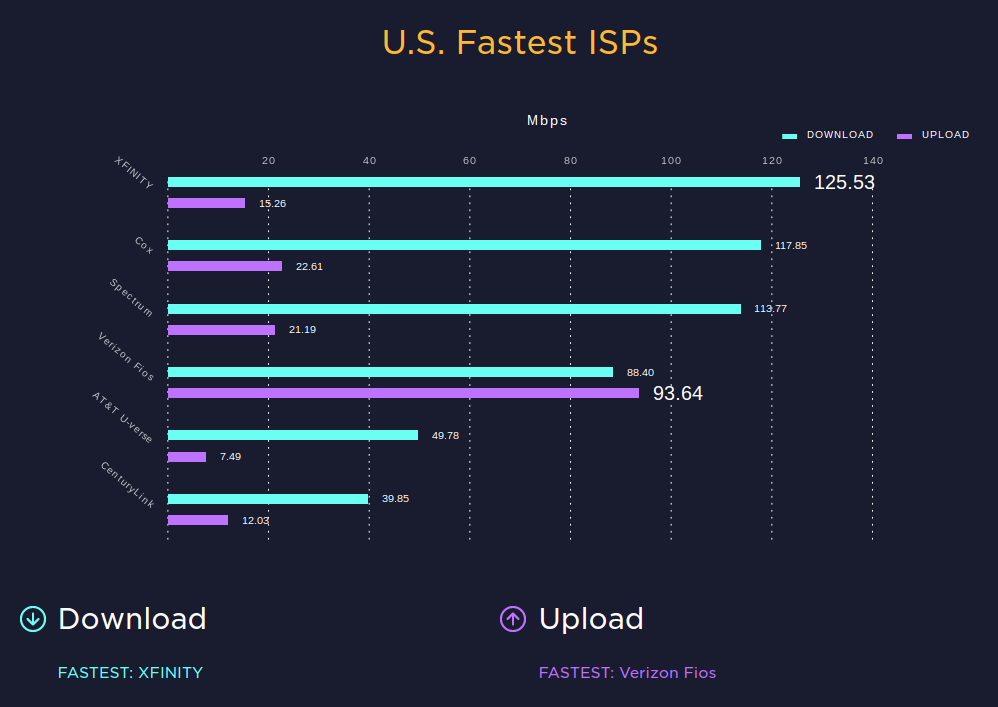
Just as important are http://liveeconcerts.blogspot.com /2016/08/over-15-years-average-internet-speed.html" style="text-decoration: none;">speed differences between various ISPs. Where Google Fiber might offer an average speed in excess of 300 Mbps, Comcast and other cable TV ISPs might average about 50 Mbps to 45 Mbps. Telcos tend to deliver slower speeds than that, with the exception of Verizon FiOS, which has an average speed of about 50 Mbps.

source: Ookla

source: Ookla

download file now

Read more »

Sunday, 20 August 2017

Download Firmware Ics Andromax U

Download Firmware Ics Andromax U


Everybody Knows About Mac OS. And Also Want To Use It. So Here Is A Tutorial How To Make YourWindows Xp/7/Vista Look Like Mac Without Any Risk.
It Not Change Full Operating System To Mac, This Is Only Theme And Some Effects That Very Similar To Mac. So Don�t Hesitate To Try It. You Can Get Back To Windows Anytime.

Now Follow The All Steps Carefully And See What Happen !
Step 1. Download This File � All Files That We Need Are In The File.

Click Here To Download (15.02 MB)
=> Now Extract The Files To Anywhere In Your Pc.

Step 2 : Open Rocketdock Folder And Install RocketDock-v1.3.5.exe.
After Install Rocketdock Do The Following : 
  1. Copy The Folder Stardocklet To C:Program FilesRocketDockDocklets
  2. Copy The Folder Nabs osx leopard To C:Program FilesRocketDockSkins
  3. After Copy It To Skin Folder, Open Nabs osx leopard Folder And Copy indicator.png To C:Program FilesRocketDockDefaultsDefaultIndicator
Step 3 : Open Replacer.zip From Apps Folder And Extract It To Desktop (Or Anywhere Else). - Little Difficult Part For Newbies !
  • Now Open Replacer.cmd And Go To C:Windowssystem32 And Find uxtheme.dll
  • Drag The uxtheme.dll File From C:Windowssystem32 To Replacer.cmd And PressEnter.
  • Now immediately Go To Apps Folder ( In Extracted Files) And Find uxtheme.dll
  • Drag This uxtheme.dll To Replacer.cmd Again And Press Enter.
  • When Replacer.cmd Ask Y Or N Press Y And Press Enter. It�s Done.
Now The Difficult Part Is Over.
Step 4 : Theme Installation � Its Very Easy !
  • Now Open Mac Theme For Windows Folder From Extracted Files.
  • Copy Leopard X.theme And X Folder To C:WINDOWSResourcesThemes.
  • Double Click On Leopard X.theme And Click Apply And Then Ok.
Now Your PC Is Changing To Mac But We Need Some Customization To Get It Completely Look Like Mac.
=> Now Go To Desktop And Right Click On Any Empty Space And Go To Arrange Icons By AndUncheck Show Desktop Icons.
If You Not Understand It Click Here To See Image : Uncheck Show Desktop Icons Image
=> Right Click on Taskbar and untick Lock Taskbar and Pull Taskbar to Top of the Screen and Again Right Click on Taskbar and tick Lock Taskbar.
If You Not Understand It Click Here To See Image : Change Taskbar Position Image
=> Now Open Rocketdock, Right Click On It And Set Screen Position To Bottom.
=> Now Right Click On Rocketdock Again And Click On Ad
d Item And Select Stack Doclet And Open It And Change Settings As You Like.
If You Not Understand It Click Here To See Image : Add Item Rocketdock Image
Now You Can Add More Effects By Installing Apps That Provide With Downloaded File In Folder Called �Apps�
If You Want More Customizations Than Contact Me Via Contact Form.
Its All.If You Had Any Problem Installing Or Customizing It Please Put Your Comments Below And Share This With Friends To Help Us.


=> UPDATE 


Many Readers Ask About How to Make Exact Windows Buttons (Back,Forward Buttons)Like Above Image.
So Today I�m Going To Give Short Tutorial About It.


Follow This Steps :

1. Download The File MAC STYLER

2.Now, Install Styler1401.msi To Your Computer.

3.Now Just Drag and Drop the �Mac Styler� Folder into �Program FilesStylerTBskinsStyler�s�

Now Open Installed Program Styler And Go To Toolbar Tab From it.
And Click On Styler�s. You Will See Mac Style Option.Click On It.
View The Image To If You Can Not Understand It.

download file now

Read more »

Monday, 31 July 2017

More U S Teens Watch YouTube Than Linear TV

More U S Teens Watch YouTube Than Linear TV


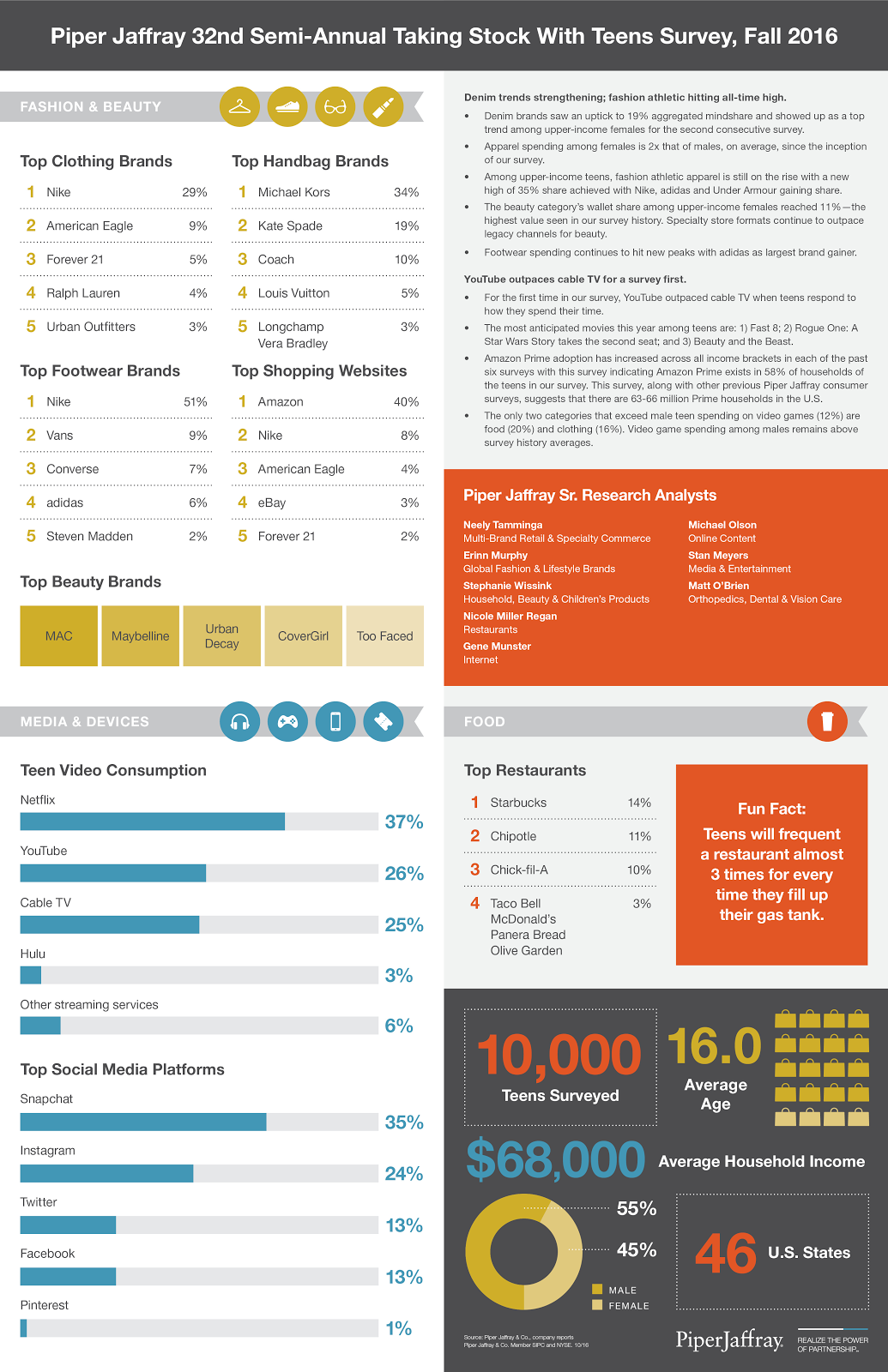
Whether YouTube is a �substitute� product for linear TV is debatable. What apparently is harder to debate is that YouTube is a preferred venue for consumer video consumption among U.S. teenagers.

In a survey of U.S. teenagers, analysts at Piper Jaffray found teens spent more time watching YouiTube than watching linear TV. Though 37 percent of respondents reported watching Netflix, 26 percent said they watched YouTube, compared to 25 percent who reported watching linear TV.

And 40 percent say their top shopping website is Amazon, leading other sites by an order of magnitude.


source: Piper Jaffray


download file now

Read more »