Showing posts with label zenfone. Show all posts
Showing posts with label zenfone. Show all posts
Wednesday, 27 September 2017
Download All the Version of Firmware For ASUS ZenFone 2 Laser ZE550KL
Download All the Version of Firmware For ASUS ZenFone 2 Laser ZE550KL
Requirmetnts :
Asus Zenfone 6 Version 2.22.40.44 .
The build is System.img only so your system is required to match the build version to system.img file
If you came from lower Version Then you need to flash Boot.img fastboot.img recovery.img and other BIN files
Thsi is A test version because i dont have an Asus ZenFone 6 So please Comment below .
For manual Flash Follow this Command
fastboot flash system.img
Download Links :
https://drive.google.com/file/d/0B8Vlzc8R44GiOWJrbGJYUDJqT2M/view?usp=sharing
Thanks..
download file now

Tuesday, 26 September 2017
Asus Zenfone 5 Firmware 2 21 40 44
Asus Zenfone 5 Firmware 2 21 40 44

This the original firmware of Asus zen fone 5 we provide made by companies Asus Zenfone Taiwan release we give you the best of the best for any question drop in our comment Pinaslang Zenfone Blog provide the easy and best for you
Zenfone 5 A500CG and A501CG Firmware
Release Date: February 4, 2015
Improvement:
- Update phone APN version to 81.
- Update per Facebook sharing policy
- Due to changes in Facebook�s service policy, ASUS apps will no longer be able to access the list of all your Facebook friends or their public information such as birthdays, feeds, public albums, and etc. Some features have been modified in order to comply with this new policy. Thank you for your understanding.
Changes on the apps:
ASUS Gallery
- Friends� public albums are no longer in service.
- Likes and comments feature are disabled.
ASUS Contacts
- Friends� recent feeds push notification are disabled.
- Lower resolution profile picture is used.
- Option to set contact�s cover image from Facebook is removed.
- Synchronization of birthday information is not supported.
Asus Phone
- Phone In-call screen
- Lower resolution profile picture is used.
Tips and Tricks
- How to know the device model?
- Path: Settings->About-> Model number
- Example: ASUS_T00F
- How to know the device software version?
- Path: Settings->About-> software information->Build number
System upgrade may cause part of data missing, please backup your important data before system upgrading.
ASUS ZenFone 5(T00F/T00J) software Image: V2.21.40.44 for CHT SKU only*
Version CHT_2.21.40.44
Version WW_2.21.40.44
Version TW_2.21.40.44
Version CHT_2.21.40.44
Version WW_2.21.40.44
Version TW_2.21.40.44
download file now
Guide Must Check These before Buying Zenfone 2
Guide Must Check These before Buying Zenfone 2
There are some issues experienced by some customers zenfone 2. Make sure you check out some of the following checklist before you buy Zenfone 2 and make sure your zenfone 2 official warranty.
- Crooked USB charging jack, Some user got this issue

- Hairline Scratch, Even out of the box some user experienced this issue

- Screen Display Quality, Beware of Dark Spot and Grey Spot. To test you can go to Test Mode (Tutorial Here)


- Camera Problem, Usually User got this issue (Open Camera -> Select Ultra High Resolution Mode)


- Booting Test, Check if it is Booting Properly
- Browsing Test, Check if the screen flickering while browsing or not
- Signal, Wifi, and Bluetooth Test
download file now
Monday, 25 September 2017
How Flashing Install Firmware Asus Zenfone 5
How Flashing Install Firmware Asus Zenfone 5

Flashing is one method to return all standard applications early in the Android smartphone device so that the device can resume running normally. The flashing process is usually done when there is damage / error or even bootloop on an android smartphone device. Here I will share how flash or install firmware on Asus Zenfone 5 specifically for your Asus product users.
Preparation :
- Download Intel Android USB drivers, install directly on your PC
- Download ADB Fastboot Tool
- Download file recovery / rom stock in accordance with Zenfone 5. How to check the firmware on the menu Settings> About> Software Information> Build Number. For example, here I will try to put the firmware 3.23.40.60 SKU ww. Which have the same firmware with this method, please download the firmware ww-3.23.40.60.
- Turn off the device Zenfone 5.
- Log into Fastboot Mode, how to press and hold the Volume Up + Power button simultaneously.
- If youve entered Fastboot mode, you select the "recovery". To select you can use the Volume Up and Volume Down while you massage course for execution Power button.
- After that you will appear Zenfone 5 android robot picture sleeping with the words "No Command".
- Next we go to the Android System Recovery mode by pressing and holding Volume Down, and then press the Volume Up button (while still holding down the Volume Down) and release the Volume Up button only (Volume Down buttons remain on hold).
- If successful, you will go into the mode "Android System Recovery" there will appear some options such as "reboot system now", "apply update from adb", "wipe cache", etc.
- After that, connect your Zenfone 5 and PC using the USB cable. (Make sure its drivers should already be installed on the PC).
- Then select the option "apply update from adb" on "Android System Recovery" on zenfone 5.
- If successful it will display a notification on the PC that Android ADB has been connected.
- After that extract the files ADB Fastboot tool that has been downloaded previously.
- On your PC, open a Command Prompt and enter the ADB Fastboot folder Tool is located. To get into the folder ADB Fastboot tool via the command prompt, you can use the command :
cd [space] folder names ADB_you
- Once the Command Prompt is at ADB Fastboot folder tool, and then type the command.
adb[space]devices
- Zenfone 5 If you are really connected to the PC via the ADB, it will exit the list of devices on the Command Prompt. The name of the connected devices consist of a collection of numbers.
- After typing it in the Command Prompt commands :
adb [space] sideload [space] firmware file name
- Once the Command Prompt appears in the process of uploading the firmware from the PC to the Zenfone. Wait for the process up to 100%.
- Once the upload is complete, watch on your Zenfone 5, there are later firmware installation process. If the phase of installation was successful and there are no error messages, then later on you will be faced with the "Android System Recovery". Then select menu "Reboot System Now".
- After the reboot is complete, the phone Zenfone 5 you will be back in New circumstances.
- Do not forget to check under this so that no error:
download file now
Sunday, 24 September 2017
ASUS Zenfone 2 Unlock Bootloader
ASUS Zenfone 2 Unlock Bootloader
Unofficial Step to Unlock Zenfone 2 Bootloader.
All Credit to Shakalaca, original post XDA

What is a bootloader? At its most basic level, your Android smartphone is like a hard drive, made of up several partitions. One of those partitions holds the Android system files, another holds all the app data you accumulate (which is how youre usually able to update without losing all your stuff), and others to do more behind-the scenes stuff.
Think of the bootloader as a security checkpoint for all those partitions. Because if youre able to swap out whats on those partitions, youre able to break things if you dont know what youre doing. Or, with a little hackery, youre able to run custom ROMs.
Think of the bootloader as a security checkpoint for all those partitions. Because if youre able to swap out whats on those partitions, youre able to break things if you dont know what youre doing. Or, with a little hackery, youre able to run custom ROMs.
Notes:
- Work for ZE551ML (Z00A) and ZE550ML (Z008)
- Update firmware first to 2.19.40.12(ZE550ML) and 2.19.40.18 (ZE551ML)
- Make sure ADB Working properly
How to Unlock Zenfone 2 Bootloader:
- Root your Zenfone 2 (Root)
- Make sure ADB is Working (Download Here if you dont have it)
- Connect Zenfone 2 to PC and open cmd at ADB path
- at Command Prompt Type (press enter after type each line): adb shell
- Phone will restart in recovery, after updating itself phone will restart and ASUS splash screen will be white.
- Download Black Splash screen (Download)
- navigate to adb folder opened cmd and type the following command:
- Done
su
getprop ro.isn > /factory/asuskey
reboot bootloader
adb reboot bootloader (pressed enter)
fastboot devices (pressed enter)
see if device is listed, write following
fastboot flash splashscreen splashscreen.img (pressed enter)
restart your phone and Now black splash screen is back. Congrats your bootloader is now unlocked
Thanks again to Shakalaca
download file now
How to Optimize ZenFone memory and performance
How to Optimize ZenFone memory and performance

U C Browser Mini APK
File Size: 1.73 MB Version:10.7.9 (102)
Update: 11 Oct 2016 Requires:Android 2.3
Direct Install
 You are downloading U C Browser Mini apk on your android phone.Download this latest version on your android and make fast your android internet browser.
U C Browser Mini is most fastest internet browser in whole world Billions of people use this Manager for fast internet and also millions of people download this manager daily.For fast downloading download this manager on your android phone and then download latest games,apps,music,and wallpapers easy ad fast.
For fast downloading go to bellow download link and click on download link.After Complete download install it on your android phone and fast get apps,games extra easy and fast.
FeaturesFast downloading all type of apps
Fast downloading games
Fast downloading wallpapers
Fast downloading music
Fastest internet browser
Fastest app
Easy and fast downloading
Fastest working browser
Download by here: Download
or Direct Install from Google Play Store
Click her for all Versions of UC Mini All Versions
download file now
Asus Zenfone 3 Update Android Nougat Sudah Didistribusikan
Asus Zenfone 3 Update Android Nougat Sudah Didistribusikan
RUMOHPONSEL.COM - Cara Flashing Panasonic T11 Via Flashtool, Memperbaki sistem android yang gagal Rom kebentuk semula atau ke bentuk system normal, Gangguan memang sulit di pecahkan dikarenakan kerusakan sebuah sistem operasi smartphone Android yang terjadi bukan factor di sengaja melainkan kendala dan kerusakan firmware bawaan system. Adapun gejala yang terjadi seperti ponsel gagal booting, mati total atau ponsel bootloop, padam, hardbrick, sering reset pabrik, masuk virus dan gangguan sistem software lainya. Berikut ini bahan dan tutorial cara flash yang saya post semoga dapat bermanfaat.

Berikut Bahan � Bahan nya.
- [Download] Firmware Panasonic T11
- [Download] Driver USB MTK
- [Download] Driver USB MT65xx
- [Download] Driver VCOM
- [Download] SP Flashtool
Notes : Sebelum anda Flashing di lakukan maka anda perlu menyiapkan bahan Flashing sepeti PC/Komputer, Kabel USB 2.0 atau 3.0, Windown XP,7,8,10 pada PC, Baterai ponsel anda minimal 50% saja sudah cukup.
Tutorial Flashing Firmware Ponsel Panasonic T11 :
1. Download dan Install android drivernya.
2. Download stock rom firmware LG sesuai tipe Ponsel.
3. Download dan extrack bahan yang dibutuhkan yang diatas.
4. Setelah Terbuka FLASHTOOL di dalam folder flashtool.
5. Klik pada �Scatter-Loading� dan pilih � MT65XX_Android_Scatter.txt� di dalam folder.
6. Klik�Download/Firmware upgrade�.
7. Jika keluar tulisan seperti ini �Download Warning�abaikan saja lalu klik �Yes�.
8. Sambungkan Ponsel anda ke komputer/PC Dalam keadaan mati sambil menekan Tombol Volume Down/Volume UP.
9. Tunggu perangkat komputer mengenali smartphone anda.
10. Jika Keluar tulisan �PMT changed for the ROM,it must be download� berati anda harus menformat dulu ponsel anda terlebih dahulu di menu format padda flashtool. Pilih �Auto Format Flash dan Format whole Flash except Bootloader� lalu Klik/OK.
11. Tunggu hingga selesai 100% dengan di tandai lingkaran hijau.
12. Cabut USB.
13. Selesai
Demikian Tutorial dari RUMOH PONSEL Semoga dapat bermanfaat untuk semua orang yang gagal sistem android di ponselnya. Beri komentar yang baik dan sopan agar Admin menanggapi komentar anda.
download file now
How to fix Rooted Zenfone 2 Cant Boot After Update
How to fix Rooted Zenfone 2 Cant Boot After Update

Today Asus Zenfone Blog will share How to Fix Rooted Zenfone 2 Cant Boot After Update. How to Root Asus Zenfone 2 Can Be Found Here. After using that method to Root My Zenfone 2 yesterday Asus gave Zenfone 2 Update, but after update my Zenfone 2 stuck on bootloop. This tutorial will resolve this problem.
- Double wipe your Zenfone 2 (Wipe Cache and Wipe Data, Tutorial Here)
- Download your zenfone 2 pre-root system.img Here and Extract it
- Flash system.img droidboot.img boot.img and recovery.img using Fastboot command
download file now
Saturday, 23 September 2017
ROM Zenfone 5 PinasLang BazzROM
ROM Zenfone 5 PinasLang BazzROM
Credit to knoneNull on XDA

ROM Feature
Fully Deodex
Superuser integrated(rooted)
Busybox System integrated
Built in XPOSED installer
Built in Greenify modules
Port Google Keyboard arm7 to x86
Remove Asus Log Sender (why we need to send a lot of logs battery eater logs they need to debug there release product in there team)
Remove Bloatware
Tweak included in system and framework res
Update all file latest application
Theme are welcome to Theme dev
Modify SystemUI and Framework Transparency
Fully System.img flashable via fastboot command
How to install
Download Pinaslang.rar
and Extract bazzrom.bat for windows auto install
Do not turm off you phone let my bat file do that for you
just double click for bazzrom.bat and wait for 2 to 3 min
note: this rom include busybox superuser xposed install and greenify this process willl wipe your data and cache so make a back up before doing, and enjoy
Download
via Mega: https://mega.co.nz/#!l4cngIjA!GWWFKlsAWb162n_eb_E3AbiA7jV5wk-efzcrPG-Ro_I
via GoogleDocs: https://docs.google.com/file/d/0ByWmVQi7JBHdaGc4NG1Db0Nlb1E/edit
Q&A
http://forum.xda-developers.com/android/help/qa-zenfone-5-pinaslang-bazzrom-t2990630
Credit to knoneNull on XDA
download file now
UPDATE Zenfone 2 Laser ZE550KL Software Update
UPDATE Zenfone 2 Laser ZE550KL Software Update

Software Update for Asus Zenfone 2 Laser ZE550KL
Recently launched Asus Zenfone 2 Laser ZE550KL have few bugs and some network related problem. However, Asus is trying to fix it as soon as possible by providing Software Updates.
Previous update (V 1.16.40.xxx) rollout on 2015/12/17 and it fixed some bugs like camera preview issue in time rewind mode, Wifi connection quality improved in 2g/3g mode. And now Asus roll out a new version(v 1.17.40.xxxx) of the software update that will improve the performance with some bug fix (See the full list of Release notes are described below).
Download Link for FOTA file is : Click Here
(RELEASE NOTE)
1. Improve 4G connection.
2. Improve network recovery mechanism.
3. Improve video recording quality.
4. Improve VOIP communication quality.
5. Improve Columbia 4G connection.
6. Improve Gmobile connection in Vietnam
#New Features
1.Theme Store Upgraded and add new theme APPs.
2. Add ZenChoice to recommend best APPs.
3. Add Security CM security.
Some of Devices have already got he FOTA and some may be didnt. Dont worry It takes upto 1 week to Push Update notification to each and every device.
Download Link for FOTA file is : Click Here
download file now
Friday, 22 September 2017
How to Root ASUS Zenfone 2 Laser ZE500KL Z00ED
How to Root ASUS Zenfone 2 Laser ZE500KL Z00ED

Couple months ago ASUS introduced their new Zenfone 2 generation including Zenfone 2 laser family. Powered with Qualcomm chipset, the root method is different with the intel chipset. Today ASUS Zenfone Blog will teach you how to root ASUS Zenfone 2 Laser (ZE500KL/Z00ED) version or 5" inch version. Thanks to Miau9202 (XDA member). DWYOR. Tested on Asus Zenfone 2 Laser ZE500KL firmware version WW_12.8.5.118. For Zenfone 2 Laser ZE550KL Root tutorial here.
For another Zenfone 2 Laser :
Root Zenfone 2 Laser ZE550KL.
Root Zenfone 2 Laser ZE500KL
Root Zenfone 2 Laser ZE500KG
How to Root ASUS Zenfone 2 Laser :
Method 1:
- Download and Install ADB Fastboot tool (Download) Run it (Require administrator privileges)
- Enable USB Debugging via Settings>Developer Options (if no developer options go Settings>About>Build number tap 7x then developer options will show up in settings)
- Download mod_boot.img (Download|Mirror Download)
- Enter fastboot Mode (Power+Volume up)
- Connect Zenfone 2 Laser with PC/Laptop
- at mod_boot.img folder open CMD (Shift+Right Click>Open Command Here)
- Type this command at CMD: fastboot boot mod_boot.img
- Now your phone should automatically reboot with root installed and working!
Press Y/Yes to install ADB and Fastboot or N/No to skip
Press Y/Yes to install ADB system-wide or N/No for current user only
Press Y/Yes to install Drivers or N/No to skip
Continue Driver installation
finished!
Method 2 (Beta):
Automated" way: If your device already has USB Debug activated and you have the proper ADB driver installed, you can just use THIS SCRIPT. Just connect your switched on phone and it will do all the steps!
 |
| Zenfone 2 Laser ZE500KL Root |
Thanks and Credit to:
XDA Thread
Miau9202
download file now
Mortal Kombat X V 1 1 0 For Asus Zenfone
Mortal Kombat X V 1 1 0 For Asus Zenfone

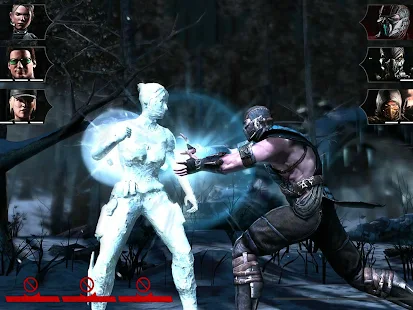
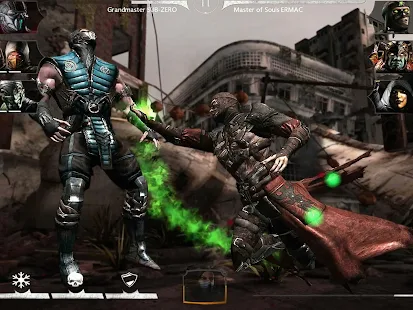
Experience the over-the-top, visceral fighting of MORTAL KOMBAT X!
Bring the power of next-gen gaming to your mobile and tablet device with this visually groundbreaking fighting and card collection game.
Assemble an elite team of Mortal Kombat warriors and prove yourself in the greatest fighting tournament on Earth.
BRUTAL 3 v 3 KOMBAT
Create your own team of Mortal Kombat fighters and lead them into battle to earn experience, new special attacks, and powerful artifacts.
MASSIVE ROSTER OF FIGHTERS
Collect Mortal Kombat veterans like Scorpion, Johnny Cage, Sub-Zero, Sonya, Kitana, Ermac, and many others. Discover the newest additions to Mortal Kombat such as the insect-like D�Vorah, fiery Cassie Cage, bloodthirsty Kotal Khan, and the mysterious Kung Jin.
JAW DROPPING X-RAYS AND FATALITIES
Mortal Kombat X brings its trademark Fatalities and X-Rays to mobile, with stunning graphics, these over the top moves punch you right in the guts.
CHALLENGE OTHER PLAYERS
Compete with other players in Faction Wars, an online competitive mode where players engage other player teams. Rank up in your own Faction�s leaderboard to earn weekly prizes.
SUMMON ALLIES INTO BATTLE
Find other players to be your Ally. Borrow a kombatant and strike a decisive blow against your enemies.
UNLOCK REWARDS IN BOTH THE CONSOLE AND MOBILE GAME
Play the game and unlock exclusive rewards for the console version of Mortal Kombat X, including ultra rare characters like Klassic Kitana and Injustice Scorpion. Playing the console version unlocks rewards in mobile as well.
NOTICE:
* Mortal Kombat X features high quality visuals. Performance is not optimized on devices with less than 1GB RAM.
** A minimum of 1.5 GB of free space is required on your device.
Content is generally suitable for ages 17 and up. Contains intense violence, blood, and gore.


Download Links:
APK Download
OBB Download
Tested on Zenfone 5, Zenfone 6 & Zenfone 2
Google Play Link Download
Enjoy it!
download file now
Subscribe to:
Posts (Atom)