Showing posts with label jellybean. Show all posts

Friday, 29 September 2017

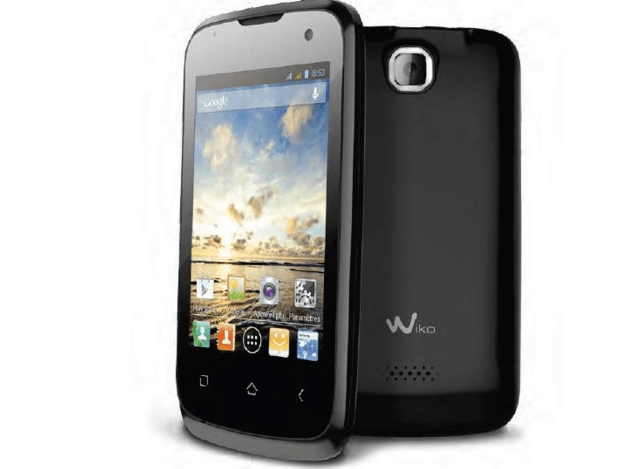
Wiko Cink Plus MT6577 Stock Firmware Jellybean 4 1 1 Flash Free

Wiko Cink Plus MT6577 Stock Firmware Jellybean 4 1 1 Flash Free


Wiko Cink Plus MT6577 Stock Firmware Jellybean 4.1.1 Flash File

Wiko Cink Plus MT6577 Stock Firmware Jellybean 4.1.1 Flash File

First step to Install Firmware

  1. Download and install MTK  android USB drivers
  2. Download And Install SP Flash Tool

How To Flash Wiko Cink Plus

  1. First, you need to download and install sp flash tool
  2. Download and install MTK  android USB drivers
  3. Then download Firmware file/Flash file/Rom for your phone
  4. Your phone must have 50 % charging before this process
  5. switch off yourmobile remove the battery (if removable) reinsert the battery and plug the USB cable in charging socket
  6. Now open SPflash tool.exe
  7. When sp flash tool open, go to download button in sp flash tool
  8. In download tab, click on scatter load button
  9. After locating the scatter tab, click on the download button
  10. Now connect your smart phone with a USB cable and press volume up or volume down key for easy detection (remove and re insert your phone battery if it is removable)
  11. Now flashing is completed, a green ring will appear in sp flash tool
  12. Close sp flash tool on your computer and unplug phone
  13. Power on the phone and enjoy
  14. After flashing process starts and might take up to 5-10 minutes. So keep patience and wait.
  15. See detailed Instruction MT flashing sp tool with images
Download Link

download file now

Read more »

Monday, 25 September 2017

SONY Media APPS for ASUS Zenfones 4 5 6 JellyBean KitKat Lollipop Firmwares SKU CHT WW TW

SONY Media APPS for ASUS Zenfones 4 5 6 JellyBean KitKat Lollipop Firmwares SKU CHT WW TW


Hello Everyone..In this Post I am sharing you the Sony Media Apps Installer for our Asus Zenfones 4/5/6 For JellBean/KitKat/Lollipop Firmwares SKU - CHT WW TW

SONY Walkman Movies Album ViPER4Android+Kernel

Download this Rar File

Walkman Features - Material Design,surroundpcm mod,alac,auto color change,widget
due to Architecture Limitation I cant port the SoundEffectsManager as it collapses with our WavesMaxX Audio Engine :-(

Album - Material Design,xReality and BraviaEngine Added :-D


INSTALLATION

This Process Needs ROOT

Zenfone 5 Lollipop Users Please Read this Thread to Root Your Firmware

Once You Downloaded ..Extract it To a Folder

Password : zenfone-five.blogspot.com

Run test.bat Which you can find inside the Extracted folder

test.bat


Follow the Instruction Given


Installation Takes Few Minutes..

This Installation Package Contains - Walkman,Album,Movies Material Designed with ViPER4Android along with its IRS Kernel which you can use it for Awesome Sound Experience by Toggling UI setting to Advanced Mode


This Walkman Will Change your Screen Color Based on the Album Cover..This is not the One which is Available for all..

Please Install BusyBox before Installing VIPER Driver..Just Search BusyBox in Playstore 


SomeTimes the Viper May not Process the Audio.So Open it and Swipe it from the Recents and it will Process automatically..You can Check that

ScreenShots: With Lollipop Firmware + Rooted


Hit Like & +1 if You Like My Work and Share this Post for all Zenfone users

Follow My Blog to get more Mods,Patches,Tutorials


download file now

Read more »

Sunday, 24 September 2017

Download Galaxy Ace 3 LTE Stock JellyBean 4 2 2 ROM

Download Galaxy Ace 3 LTE Stock JellyBean 4 2 2 ROM


Download Galaxy Ace 3 LTE Stock JellyBean [4.2.2] ROM:
  1. Stock Jelly Bean ROM For Ace 3 LTE (S7275R)
Note: 
This ROM is Only Suitable For Galaxy Ace 3 LTE (S7275R).If Youre having (S7275B,T) Varients means Just Download out the correct firmware depends on Your Country & Region.

How To Install Videos:
  1. Install Stock Jelly Bean ROM For Ace 3 LTE (S7275R)
Galaxy Ace 3 PlayLists:
  1. Galaxy Ace 3 [Custom ROMS & Recoveries]

    download file now

    Read more »

    Friday, 15 September 2017

    Firmware Asus Zenfone 5 Lengkap dari Jellybean Kitkat sampai Lolipop

    Firmware Asus Zenfone 5 Lengkap dari Jellybean Kitkat sampai Lolipop


    Ada 3 server download tersedia di ASUS Ambil Site - Global, China dan P2P. Setiap server memberikan persis konten yang sama di mana pun Anda men-download dari, kecuali untuk kecepatan yang Anda terhubung.


    Hasil gambar untuk ZenFone_5_A500CG


    Firmware (66)Versi  CN_3.24.40.80 (MR13)

    Deskripsi

    ASUS ZenFone 5(T00F/T00J) software Image: V3.24.40.80 (Android L) for CN SKU only
    Note1: If the device is already update to V3.23.40.57 (Android L) , you can either choose by FOTA or manually update to V3.24.40.80
    Note2: If the device is already update to V2.22.40.54 (Android KK) , please follow below steps to upgrade from KK to L.
     
    Note3: Put the file to the device root directory

    Steps of Update:
     
    1.Check software version of your device**
    2.Download device software and Update SOP (From �Manual� Item)
    3.Only apply to same SKU update, Example: WW->WW, CN->CN, TW->TW.
    4.Software update cannot transfer the software SKU and downgrade the software version.
    5.Wrong SKU may cause update failure, please update the same SKU version only.

    New Features:
    1) features in ASUS ZenCircle :
    1. Explore and follow the most popular or featured creations
    2. Interact with friends via likes and comments
    3. Share photos to Facebook, LINE, and other social networks
    4. Allows you to take photos and apply customizable filter effects.
    5. Discover amazing photo stories created using ASUS PixelMaster Camera and ASUS PhotoCollage

    Update:
    1)Update phone APN version
    2)update framecount synchronization
    3)support blocking private call
     
    4)Enable schedulely scan for wifi even while device is screen off

    * Please note that Android 5.0 Lollipop does not support some pre-installed apps. The listed apps below will be removed once the Android 5.0 Lollipop upgrade is complete. The update and installation will take some time.
    1. Battery widget
    2. PhotoFrame widget
    3. Movie Studio
    4. Cloud Print
    5. CMClient
    6. Magic Smoke Wallpapers

    * No longer support NTFS format SD card. Please remember to backup your SD card data before upgrade to Android L with following steps:
    1. Connect your ZenFone and computer with USB cable
    2. Enter your ZenFone storage via computer
    3. Select all data and copy it. Paste all your SD card data to your computer


    *How to know the device model?
     
    Path: Settings->About-> Model number
    Example: ASUS_T00I

    **How to know the device software version?
     
    Path: Settings->About-> software information->Build number

    ***System upgrade may cause part of data missing, please buckup your important data before system upgrading.

    File Size

    647,35 MBytes pembaruan 2015/12/01

    Download from

    Global


    Versi  CHT_3.24.40.78

    Deskripsi

    ASUS ZenFone 5(T00F/T00J) software Image: V3.24.40.78 for CHT SKU only*
    Note1: Please make sure update software version after V2.22.40.54 first before update to software version V3.24.40.78
    Note2: If you had encrypted phone, please backup image and decrypt phone (reset) before update KK to Android L
    Note3: If you downgrade the device to V2.21.40.44 before, please update to the V2.22.40.54 first.

    Improvement Items:
    1) Added features in ASUS ZenCircle :
    1. Explore and follow the most popular or featured creations
    2. Interact with friends via likes and comments
    3. Share photos to Facebook, LINE, and other social networks
    4. Allows you to take photos and apply customizable filter effects.
    5. Discover amazing photo stories created using ASUS PixelMaster Camera and ASUS PhotoCollage
    2) Update phone APN version
    3) update framecount synchronization
    4) support blocking private call
    5) Enable schedulely scan for wifi even while device is screen off


    For more information please refer to:
    TW
    ?http://www.asus.com/zentalk/tw/ReleaseNotes
    WW
    ?http://www.asus.com/zentalk/ReleaseNotes
    CN
    ?http://zentalk.asus.com.cn/ReleaseNotes


    Steps of Update: 
    1. Check software version of your device**
    2. Download device software and Update SOP (From �Manual� Item)
    3. Only apply to same SKU update, Example: WW->WW, CN->CN, TW->TW.
    4. Software update cannot transfer the software SKU and downgrade the software version.
    5. Wrong SKU may cause update failure, please update the same SKU version only.
    *How to know the device model? 
    Path: Settings->About-> Model number
    download file now

    Read more »

    Wednesday, 9 August 2017

    Wiko Barry Android 4 2 2 Jellybean Firmware Flash Free

    Wiko Barry Android 4 2 2 Jellybean Firmware Flash Free


    Image result for Wiko Barry Android 4.2.2

    Wiko Barry Android 4.2.2 Jellybean Firmware Flash File

    First step to Install Firmware

    1. Download and install MTK  android USB drivers
    2. Download And Install SP Flash Tool

    How To Flash Wiko Barry

    1. First, you need to download and install sp flash tool
    2. Download and install MTK  android USB drivers
    3. Then download Firmware file/Flash file/Rom for your phone
    4. Your phone must have 50 % charging before this process
    5. switch off yourmobile remove the battery (if removable) reinsert the battery and plug the USB cable in charging socket
    6. Now open SPflash tool.exe
    7. When sp flash tool open, go to download button in sp flash tool
    8. In download tab, click on scatter load button
    9. After locating the scatter tab, click on the download button
    10. Now connect your smart phone with a USB cable and press volume up or volume down key for easy detection (remove and re insert your phone battery if it is removable)
    11. Now flashing is completed, a green ring will appear in sp flash tool
    12. Close sp flash tool on your computer and unplug phone
    13. Power on the phone and enjoy
    14. After flashing process starts and might take up to 5-10 minutes. So keep patience and wait.
    15. See detailed Instruction MT flashing sp tool with images
    Download Link

    download file now

    Read more »