Thursday, 28 September 2017
Is there a competition law issue lurking on the horizon of cloud computing
Is there a competition law issue lurking on the horizon of cloud computing
In 2006, Amazon made available a beta version of a service called �Elastic Compute Cloud�, described as

As such, AWS early on enjoyed first mover advantage (being the first cloud computing service �to succeed on a large scale�) and continues to benefit from network effects. As well, the burden of switching costs served to make it more likely that a user will be reluctant to move to another cloud service. Based on these advantages, AWS has raced far ahead of its competition. It is three times larger than its nearest competitor�Microsoft Azure. Other potential competitors are even less visible, including competing offerings from IBM and Google. At least these two hi-tech behemoths are still in the game; Hewlett-Packard has apparently simply withdrawn from the field. Even Salesforce.com, which is a prominent provider of on-line applications, announced that it will begin to make use of AWS services.
What will slow AWS�s continued dominant position in the industry? The article suggests that users are aggressive in trying to avoid being locked-in to AWS as their sole cloud services provider. It further reports that, at least in Europe, two-fifths of the companies in the cloud use more than one cloud service. Also, while the AWS service is highly popular with start-up developers, it has less success in attracting larger, established companies, in part, it would seem, from a hesitation by such companies to be tied up with a potential competitor, given the ever-increasing nature of Amazon�s product and service offerings. These countervailing forces argue that there may be a limit as to how much more AWS can grow.
Still, based on the information in the article, AWS does seem to enjoy a dominant position with smaller developers. If this were to be found to be the relevant population for vetting competition law concerns, then attention to pricing (should prices begin to tick upwards) and the ease or difficulty of switching to another cloud service, bears watch, especially since the computing infrastructure required might serve as a potential barrier to entry for competitors. Or perhaps less conventional metrics will be brought to bear. The article itself does not go into a discussion of how anti-competitive behavior by AWS might look, stating merely that�
�AWS could end up dominating the IT industry just as IBM�s System/360, a family of mainframe computers, did until the 1980s. If that happens, the antitrust authorities may eventually have to step in, as they did with IBM.�

read also: How to Unlock LG Optimus F6 Metro PCS Pattern/Security Code Free
Even more, this Kat remembers the frequently made comment that antitrust suits such as the IBM case, especially in the technology area, are almost always late to the game: either the technology is passing the target industry by, or the law suit is a cue to the target to seek new products and markets. If this be true, then it raises an interesting question: what would the filing of such a law suit say about the cloud-computing industry? Is the pace of innovation so seriously stuck in neutral, and the nature of cloud-computing so very different from the world of IBM�s System/ 360 family of mainframe computers, that there might be greater justification in considering such a law suit, should there be prima facie indicia of anti-competitive behavior? Or will such a suit be a redux of the IBM litigation? Stay tuned (especially if your computing connectivity is from the cloud).
download file now

Is Android 8 0 O public roll out nearing Google Pixel devices may get it first
Is Android 8 0 O public roll out nearing Google Pixel devices may get it first

Id look for the official Google Pixel Android O update to land in about a week. Could be pushed, but thats the timeline for now AFAIK.� David Ruddock (@RDR0b11) August 2, 2017


download file now
Monday, 25 September 2017
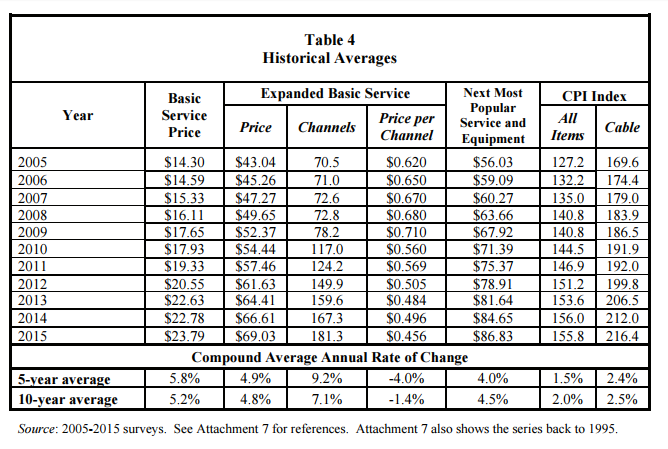
The Reason Why Video Entertainment is The Only Service To Increase Prices
The Reason Why Video Entertainment is The Only Service To Increase Prices

download file now
Friday, 22 September 2017
Nokia Bubbles Experimental project is terminated
Nokia Bubbles Experimental project is terminated

download file now
Monday, 18 September 2017
Octoplus Octopus Box Samsung Software v 2 5 1 is out!
Octoplus Octopus Box Samsung Software v 2 5 1 is out!
Octoplus / Octopus Box Samsung Software v.2.5.1 is out!
We have added support for different models of Samsung Galaxy A3, Samsung Galaxy A5, Samsung Galaxy A7,
Samsung Galaxy J7 and worlds first support for Samsung Z2!

Octoplus / Octopus Box Samsung Software v.2.5.1 Release Notes:
?? Added support for the following models:
- SM-A320F - added Direct Unlock, Read/Write Security, Read/Write EFS, Enable Hidden Languages, Write Firmware, Read PIT, Reboot in Download/Recovery Mode
- SM-A320FL - added Direct Unlock, Read/Write Security, Read/Write EFS, Enable Hidden Languages, Write Firmware, Read PIT, Reboot in Download/Recovery Mode
- SM-A320Y - added Direct Unlock, Read/Write Security, Read/Write EFS, Enable Hidden Languages, Write Firmware, Read PIT, Reboot in Download/Recovery Mode
- SM-A520F - added Read/Write Security, Read/Write EFS, Enable Hidden Languages, Write Firmware, Read PIT, Reboot in Download/Recovery Mode
- SM-A520K - added Read/Write Security, Read/Write EFS, Enable Hidden Languages, Write Firmware, Read PIT, Reboot in Download/Recovery Mode
- SM-A520L - added Read/Write Security, Read/Write EFS, Enable Hidden Languages, Write Firmware, Read PIT, Reboot in Download/Recovery Mode
- SM-A520S - added Read/Write Security, Read/Write EFS, Enable Hidden Languages, Write Firmware, Read PIT, Reboot in Download/Recovery Mode
- SM-A520W - added Read/Write Security, Read/Write EFS, Enable Hidden Languages, Write Firmware, Read PIT, Reboot in Download/Recovery Mode
- SM-A720F - added Read/Write Security, Read/Write EFS, Enable Hidden Languages, Write Firmware, Read PIT, Reboot in Download/Recovery Mode
- SM-J327P - added Direct Unlock, Domestic Unlock, Read/Write NVM, Read/Write QCN, Read/Write Security, Read/Write EFS, Enable DIAG, Write Firmware, Read PIT, Reboot in Download/Recovery Mode
- SM-J727P - added Direct Unlock, Domestic Unlock, Read/Write NVM, Read/Write QCN, Read/Write Security, Read/Write EFS, Enable DIAG, Write Firmware, Read PIT, Reboot in Download/Recovery Mode
- SM-Z200M - added worlds first Direct Unlock, Read Codes, Read/Write Cert, Read/Write Security, Read/Write EFS, Write Firmware, Read PIT, Reboot in Download/Recovery Mode
- GT-N5110 - added Repair EFS (thanks to Mr. mirazg)
?? Added display of Factory Servers (Unlock / FRP) status on status bar of "Octoplus/Octopus Samsung Factory Services" window
?? Improved Unlock / Read Codes / Write Cert / Read Cert operations for SM-G920x/SM-G925x/SM-G928x/SM-N920x phone series with damaged security
?? Improved Repair Security / Wipe Security operation for SM-G920x/SM-G925x/SM-T710x/SM-T715x/SM-T810x/SM-T815x device series
?? Improved Repair Network operation for SM-G925x phone series
?? Improved Read Codes operation for some old Qualcomm devices?? Uploaded root files for SM-A320x/SM-A520x/SM-A720F into the Support Area ("samsung/for unlock and repair" folder)
?? All supported operations described in details in the manual ("Cable & Manual" button in the software)
 www.octoplusbox.com
download file now
Friday, 15 September 2017
How Batik Is Made
How Batik Is Made

What is the most different Batik with the other fabric? Shortly, in the making, Batik using wax.
- Molani


download file now
Wednesday, 13 September 2017
CS Tool 1 57 1 Added Qualcomm Customize Flashing Qualcomm eMMC Storage Mode etc update is here
CS Tool 1 57 1 Added Qualcomm Customize Flashing Qualcomm eMMC Storage Mode etc update is here

CS-Tool 1.57.1 Added Qualcomm Customize Flashing & Qualcomm eMMC Storage Mode.. etc...
Whats New
Added Support CPU
- Qualcomm MSM8976 - Snapdragon 652
- Qualcomm Image/Flash Customizing
-- Flash any Partition can select & unselect
- Qualcomm eMMC Storage Download Mode
--
Quote:
- Firehorse Protocal updated for Lenovo, vivo, oppo
Supported List of Features:
Add Supported CPU
Qualcomm MSM 8X10 - SnapDragon 200
Qualcomm MSM 8X12 - SnapDragon 200
Qualcomm MSM 8909 - SnapDragon 210
Qualcomm MSM 8916 - SnapDragon 410
Qualcomm MSM 8929 - SnapDragon 415
Qualcomm MSM 8917 - SnapDragon 425
Qualcomm MSM 8936 - SnapDragon 610
Qualcomm MSM 8939 - SnapDragon 615
Qualcomm MSM 8976 - Snapdragon 652
Support CPU : Qualcomm MSM 8X10,8X12,8909,8916,8929,8917,8936,8939,8976 - Generic Phones/Brands
* Read Info
* Read android Properties
* Read Firmware (CST Format)
* Write Factory FW (Factory Format *.xml & CST Format )
* Write Fimrware (CST Format)
* Read patten lock ( Android Version 4.X.X & 5.X.X)
* Reset Patten lock ( Android Version 6.X.X)
* Reset user lock (Android Version Support upto 6.X.X)
* Reset FileSystem (Android Version Support upto 6.X.X)
* Read phone Book
* Read Contacts Book
* Read Call History
- Android File/Media Manager
--Support CPU : Qualcomm MSM 8X10,8X12,8909,8916,8929,8917,8936,8939 - Generic Phones/Brands
- Internal Storage- All Files - Completly Browse all file wit Tree View and Export any
- Internal Storage - Privacy - Export All images , Audio, Videos files
- Internal Storage - System - Export System images, Images , Audio, Videos files
- Images - Select from Dropdown for All images Or Selected images from Internal Storage Privacy
- Audio - Select from Dropdown for All Audio Or Selected images from Internal Storage Privacy
- Video - Select from Dropdown for All Video Or Selected images from Internal Storage Privacy
- APK - Easy Tab for Export Apk From Internal Storage - All files
- ZIP - easy Tab For Zip Archive from Internal Storage - All files
- Images - Easy Tab Images from internal Storage - all files
- Export Current Item
- Export all Items
- Export all select items
Phone Data Can able to Read on
- Phone Hang On logo or Boot Looped
- Phone Dead
- Phone SemiDead
- Phone Broken
* phone Must be boot Via USB and not erased/Format
* MTK Android Only Supported
* Generic Brands/Phones Support only support
*** Not Required Root the phonr
*** Not Required USB Debugging
*** Not Required Credits
*** Not Required internet connect
*** Not Required any Credits or logs
- Auto Boot
- Customize Boot - use Can Select "prog_emmc_firehose_XXXX.mbn - from Factory file , and send us logs if Shows unknow MSM ID/Processor ID
download link
Index of pub/
Another Hot Updates On the way
More Interesting Pre News
* Follow us on Facebook
Best Regards
CS-Tool
download file now
Monday, 11 September 2017
THE SKY IS FALLING
THE SKY IS FALLING


download file now
Sunday, 10 September 2017
how to check bootloder is locked or unlocked
how to check bootloder is locked or unlocked
type this in adb
C:adb>fastboot oem device-info
...
(bootloader) Device unlocked: true
(bootloader) Charger screen enabled: false
(bootloader) Display panel:
OKAY [ 0.010s]
finished. total time: 0.010s
if (bootloader) Device unlocked: true then its unlocked
if(bootloader) Device unlocked: false then its locked
download file now
Thursday, 7 September 2017
Microsoft Word Add to dictionary is greyed out How to enable Add to dictionary in Microsoft Word
Microsoft Word Add to dictionary is greyed out How to enable Add to dictionary in Microsoft Word

Moy 4 Virtual Pet Game for Android

(Moy 4 Virtual Pet Game Download From Google Play Store)
download file now
Tuesday, 5 September 2017
For All Networks Fiber to Where You Can Make Money is the Issue
For All Networks Fiber to Where You Can Make Money is the Issue

download file now
Monday, 4 September 2017
MY NAME IS RED ORHAN PAMUK
MY NAME IS RED ORHAN PAMUK


download file now
Saturday, 2 September 2017
O MG the Developer Preview of Android O is here!
O MG the Developer Preview of Android O is here!

Posted by Dave Burke, VP of Engineering
Since the first launch in 2008, the Android project has thrived on the
incredible feedback from our vibrant ecosystems of app developers and device
makers, as well as of course our users. More recently, weve been pushing hard
on improving our engineering processes so we can share our work earlier and more
openly with our partners.
So, today, Im excited to share a first
version of the OS: Android O. The usual caveats apply: its early days, there
are more features coming, and theres still plenty of stabilization and
performance work ahead of us. But its booting :).
Over the course of the next several months, well be releasing updated developer
previews, and well be doing a deep dive on all things Android at
wed love your feedback on trying out new features, and of course testing your
apps on the new OS.
Whats new in O?
Android O introduces a number of new features and APIs to use in your apps.
Heres are just a few new things for you to start trying in this
first Developer Preview:
Background limits: Building on the work we began in Nougat,
Android O puts a big priority on improving a users battery life and the
devices interactive performance. To make this possible, weve put additional
automatic limits on what apps can do in the background, in three main areas:
implicit broadcasts, background services, and location updates. These changes
will make it easier to create apps that have minimal impact on a users device
and battery. Background limits represent a significant change in Android, so we
want every developer to get familiar with them. Check out the documentation on
execution limits and
location limits for details.
Notification channels: Android O also introduces
channels, which are new app-defined categories for notification content.
Channels let developers give users fine-grained control over different kinds of
notifications — users can block or change the behavior of each channel
individually, rather than managing all of the apps notifications together.
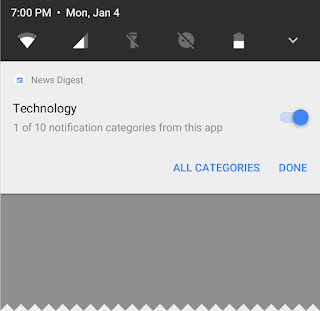
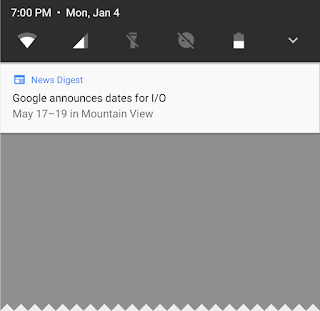
Notification channels let users control your apps notification categories
Android O also adds new visuals and grouping to notifications that make it
easier for users to see whats going on when they have an incoming message or
are glancing at the notification shade.
Autofill APIs: Android users already depend on a range of
password managers to autofill login details and repetitive information, which
makes setting up new apps or placing transactions easier. Now we are making this
work more easily across the ecosystem by adding platform support for autofill.
Users can select an autofill app, similar to the way they select a keyboard app.
The autofill app stores and secures user data, such as addresses, user names,
and even passwords. For apps that want to handle autofill, were
new APIs to implement an Autofill service.
PIP for handsets and new windowing features:
in Picture (PIP) display is now available on phones and tablets, so users
can continue watching a video while theyre answering a chat or hailing a car.
Apps can put themselves in PiP mode from the resumed or a pausing state where
the system supports it - and you can specify the aspect ratio and a set of
custom interactions (such as play/pause). Other new windowing features include a
app overlay window for apps to use instead of system alert window, and
support for launching an activity on a remote display.
Font resources in XML:
are now a fully supported resource type in Android O. Apps can now use fonts in
XML layouts as well as define font families in XML — declaring the font style
and weight along with the font files.
Adaptive icons: To help you integrate better with the device
UI, you can now create
adaptive icons that the system displays in different shapes, based on a mask
selected by the device. The system also animates interactions with the icons,
and uses them in the launcher, shortcuts, Settings, sharing dialogs, and in the
overview screen.
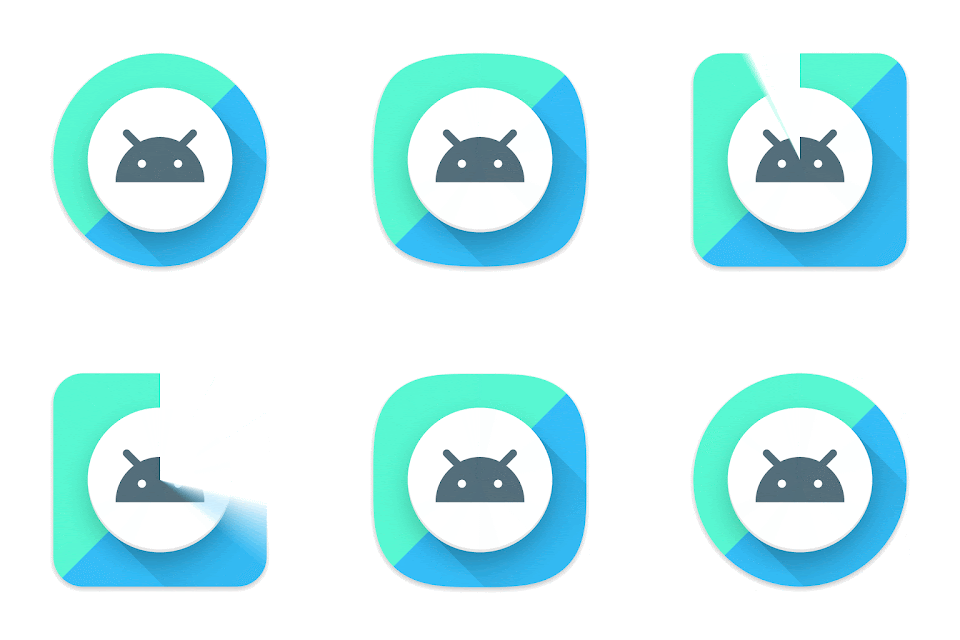

Adaptive icons display in a variety of shapes across different device models.
Wide-gamut color for apps: Android developers of imaging apps
can now take advantage of new devices that have a wide-gamut color capable
display. To display wide gamut images, apps will need to enable a flag in their
manifest (per activity) and load bitmaps with an embedded wide color profile
(AdobeRGB, Pro Photo RGB, DCI-P3, etc.).
Connectivity: For the ultimate in audio fidelity, Android O now
also supports high-quality Bluetooth audio codecs such as
Wi-Fi
Aware, previously known as Neighbor Awareness Networking (NAN). On devices with
the appropriate hardware, apps and nearby devices can discover and communicate
over Wi-Fi without an Internet access point. Were working with our hardware
partners to bring Wi-Fi Aware technology to devices as soon as possible.
The Telecom framework is extending ConnectionService APIs to enable third party
calling apps integrate with System UI and operate seamlessly with other audio apps.
For instance, apps can have their calls displayed and controlled in different kinds
of UIs such as car head units.
Keyboard navigation: With the advent of Google Play apps on Chrome
OS and other large form factors, were seeing a resurgence of keyboard
navigation use within these apps. In Android O we focused on building a more
reliable, predictable model for "arrow" and "tab" navigation that aids both
developers and end users.
AAudio API for Pro Audio: AAudio is a new native API thats
designed specifically for apps that require high-performance, low-latency audio.
Apps using AAudio read and write data via streams. In the Developer Preview
were releasing an early version of this new API to get your feedback.
WebView enhancements: In Android Nougat we introduced an
optional multiprocess mode for WebView that moved the handling of web content
into an isolated process. In Android O, were enabling multiprocess mode by
default and adding an
to let your app handle errors and crashes, for enhanced security and
improved app stability. As a further security measure, you can now opt in your
apps WebView objects to
URLs through Google Safe Browsing.
Java 8 Language APIs and runtime optimizations: Android now supports
several new Java Language APIs, including the new java.time API. In addition,
the Android Runtime is faster than ever before, with improvements of up to 2x on
some application benchmarks.
Partner platform contributions: Hardware manufacturers and
silicon partners have accelerated fixes and enhancements to the Android platform
in the O release. For example, Sony has contributed more than 30 feature
enhancements including the
Get started in a few simple steps
First, make your app compatible to give your users a seamless
transition to Android O. Just download a
system image or emulator system image, install your current app, and test --
the app should run and look great, and handle
changes properly. After youve made any necessary updates, we recommend
publishing to Google Play right away without changing the apps platform
targeting.
Building with Android O
When youre ready, dive in to O in depth to learn about
everything you can take advantage of for your app. Visit the
Preview site for details on the
timeline,
changes,
APIs, and
resources.
Plan how your app will support
limits and
changes. Try out some of the great new features in your app --
channels,
icons,
resources in XML,
TextView, and
others. To make it easier to explore the new APIs in Android O, weve
brought the
diff report online, along with the
O API reference.
The latest canary version of
includes new features to help you get started with Android O. You can download
and set up the O preview SDK from inside Android Studio, then use Android Os
font resources and
TextView in the Layout Editor. Watch for more Android O support coming in
the weeks ahead.
Were also releasing an
version of the 26.0.0 support library for you to try. This version adds a number of new APIs and increases the minSdkversion to 14. Check out the release notes for details.
Preview updates
The O Developer Preview includes an updated SDK with system images for testing
on the official Android Emulator and on Nexus 5X, Nexus 6P, Nexus Player, Pixel,
Pixel XL and Pixel C devices. If youre building for wearables, theres also an
emulator for testing Android Wear 2.0 on Android O.
We plan to update the preview system images and SDK regularly throughout the O
Developer Preview. This initial preview release is for developers
only and not intended for daily or consumer use, so were making it
available by manual download and flash only.
and instructions are here.
As we get closer to a final product, well be inviting consumers to try it out as
well, and well open up enrollments through Android Beta at that time. Stay
tuned for details, but for now please note that Android Beta is not
currently available for Android O.
Give us your feedback
As always, your feedback is crucial, so please
know what you think — the sooner we hear from you, the more of your
feedback we can integrate. When you find issues, please
here. Weve moved to a more robust tool,
internally at Google to track bugs and feature requests during product
development. We hope youll find it
use.
download file now
Tuesday, 29 August 2017
What Is IMEI Number How To Find It
What Is IMEI Number How To Find It
HUAWEI Y520-U22 Unfortunately Has Stoped Dane Fix Flash File
HUAWEI Y520-U22 FLASH FILE New Version
HUAWEI Y520-U22 Lock Remove Factory Flash File
HUAWEI Y520-U22 Flash File 1000% Hang Logo Problem Solve
HUAWEI Y520-U22 Flash File System Recovery Update
HUAWEI Y520-U22 Flash File Upgrade Version
HUAWEI Y520-U22 Flash File Official Firmware Download
DIGO V501
Phone Lock
Password Lock
Pattern Lock
Face Lock Remove


download file now
Wednesday, 23 August 2017
Sunday, 20 August 2017
When is a Terabyte Household Data Consumption Limit a Problem
When is a Terabyte Household Data Consumption Limit a Problem
download file now